If you want a job in 2026 or beyond, the first skill you must master is how to make ats friendly resume. It does not matter whether you are a fresher, a digital marketer, a developer, or a career switcher.
Your resume must pass ATS before a human ever sees it. Many skilled people lose opportunities only because their resume cannot be read by ATS filters.
As someone who has mentored more than fifty thousand students globally and consulted five thousand businesses, I have seen thousands of job rejections that had nothing to do with skills.
The resumes failed because they were designed poorly, formatted incorrectly, or lacked the right keywords. This is the silent career killer most candidates never realize.
The truth is simple:
Recruiters do not reject most resumes. ATS does.
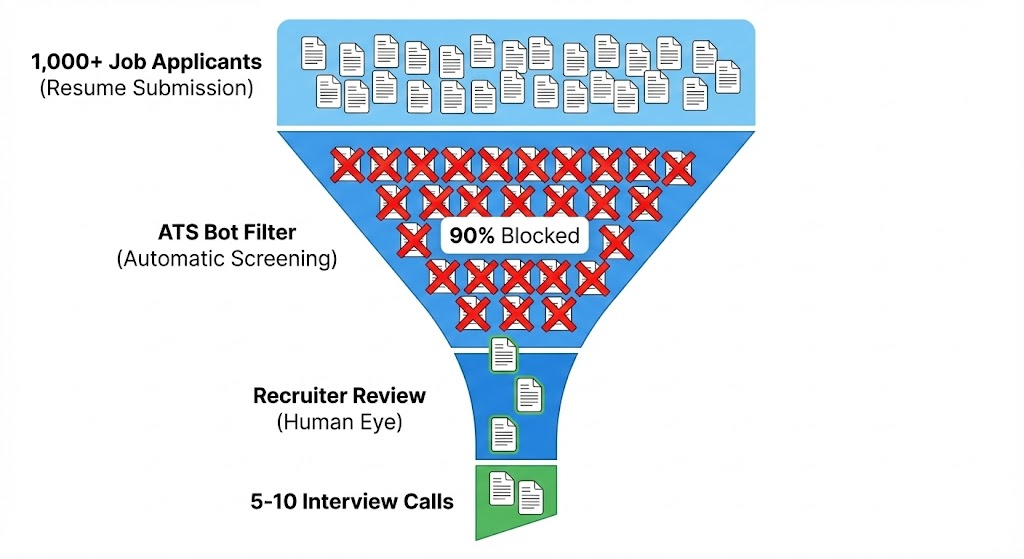
And because companies are now flooded with applications, ATS systems have become more strict, more keyword-dependent, and more algorithm-driven.
In fact, AI-powered ATS versions used in 2026 can scan your resume in under one second, extract entities, compare your skills with the job description, and rank your resume on a relevance scale.
Your entire career possibility may get decided before a human even clicks your application.
That is why this guide is different.
It is not a superficial article.
It is built from real hiring data, real resume reviews, and real job placement experience inside AADME, where I personally train students using industry frameworks to get job-ready.
In this guide, you will learn:
- How ATS systems actually read your resume
- What formatting rules increase shortlist chances
- How to place keywords the right way
- How to make resume ats friendly if you are a fresher
- How to build an ats friendly digital marketing resume
- Which templates work and which fail
- How to convert an existing resume into ATS format
- How to use ChatGPT and AI tools for better accuracy
- Real examples and frameworks used in my mentorship programs
This article will save you years of trial and error. Let us begin by understanding the base system.

What is an ATS and why does It Matter in 2026?
An ATS, or Applicant Tracking System, is a software used by companies to manage job applications. It reads resumes, extracts information, filters candidates, ranks them, and hides those that do not match the job description.
More than ninety percent of companies use ATS today because it helps them sort through thousands of resumes quickly.
Why ATS dominates modern hiring?
Recruiters receive hundreds of applications per job posting. Reading each resume manually is impossible. ATS helps them automate the first screening step.
The system scans your resume for keywords, structure, skills, education, and experience. If your resume lacks clarity or contains design-heavy elements, the ATS cannot read it.
Once the ATS fails to read it, your resume gets rejected automatically.
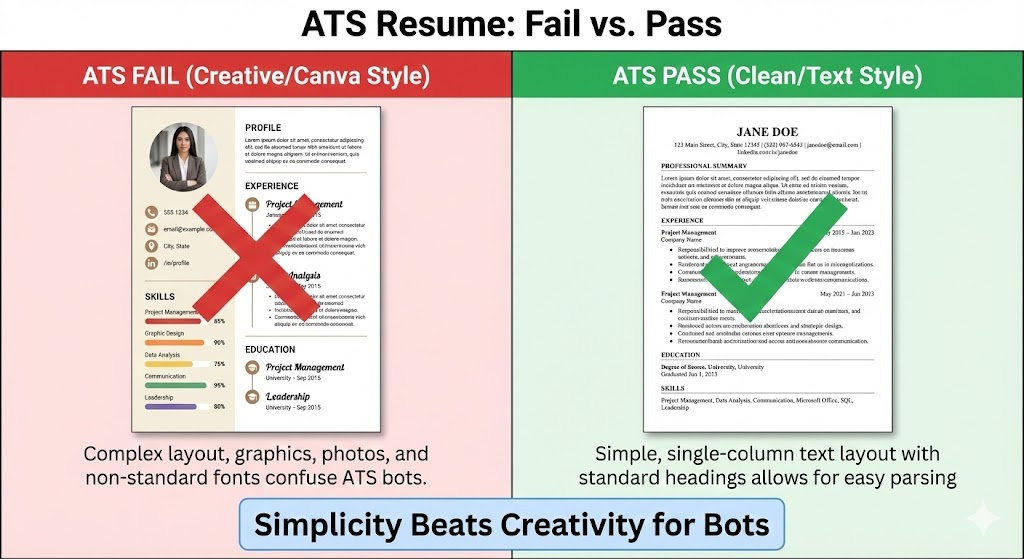
I have seen candidates lose interviews because they used a creative Canva template. The design looked beautiful, but the ATS extracted only 20 percent of the information.
As a result, the system marked it irrelevant.
This is the hidden reason many skilled people never get interview calls.
Why this matters in 2026?
ATS systems are becoming smarter. They now use AI, NLP, and contextual scoring.
Some ATS software even compares your resume with top-performing candidates who were previously hired for similar roles.
That means your resume must be structured in a way that is both machine-readable and human-friendly.
If you master how to make an ATS-friendly resume, your chances increase dramatically.
If you want to strengthen your job readiness while building your resume, you can explore Digital Marketing for Beginners. Practical digital skills directly increase your hiring confidence.
How ATS Works Behind the Scenes?
Most job seekers think ATS is just a keyword scanner. In reality, ATS uses a detailed pipeline. Understanding this pipeline will help you optimise your resume strategically.
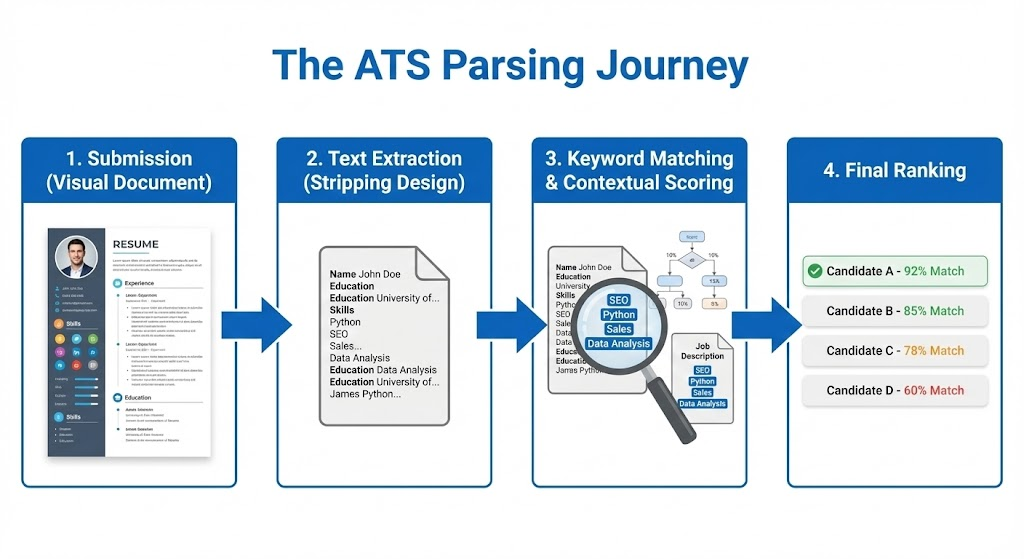
How ATS reads your resume step-by-step?
- File ingestion
ATS starts by reading your file. Files with graphics, text boxes, or images confuse the system. That is why simple layouts work best. - Text extraction
It extracts plain text. If your resume has icons instead of bullet points or text inside shapes, ATS cannot parse it. - Keyword matching
ATS compares your content with the job description, scanning for role-specific keywords, skills, certifications, and tools. - Relevance scoring
The system scores your resume based on keyword presence, keyword context, and sentence structure. - Candidate ranking
Your resume is ranked among all applicants. Recruiters view top-ranked resumes first. - Human review
Only if your resume looks relevant, a human recruiter opens it.
The biggest blocker in ATS parsing
ATS cannot understand:
- tables
- graphics
- icons
- multiple columns
- images converted to text
- modern Canva resume designs
- infographic resumes
I once reviewed a resume from a brilliant PPC student. He used progress bars to show Google Ads skills and icons for achievements. The ATS extracted almost nothing.
When we rebuilt his resume using an ATS-friendly template, he secured two interview calls within seven days.
If you want to build hiring-focused portfolios instead of just resumes, read How to Create a Digital Marketing Portfolio. It will help you stand out beyond the ATS process.
Primary Rules on How to Make ATS-Friendly Resume
To understand how to make ats friendly resume correctly, you must follow a structured set of rules. These rules come from real hiring patterns I have seen while helping students secure jobs across India, UAE, UK, and the US.
Your resume needs to be clean, readable, and aligned with the job description. A resume is not a design project. It is a clarity document.
Rule 1: Use a clean single-column layout
ATS reads from top to bottom. Multi-column layouts confuse the reading order. A single column ensures proper extraction.
Rule 2: Use standard fonts only
Use fonts like Arial, Calibri, Helvetica, or Times New Roman. Fancy fonts break ATS parsing.
Rule 3: Avoid every form of design element
Do not use:
- tables
- icons
- shapes
- graphs
- progress bars
- profile photos
- background colors
Even Canva templates can fail ATS readability because they include invisible layers.
Rule 4: Use role-specific keywords
If the job description includes Google Ads, A/B testing, and campaign optimisation, these terms must appear naturally in your resume. Without keyword alignment, ATS reduces your score.
Rule 5: Write achievements, not responsibilities
A strong ATS-friendly resume focuses on outcomes.
Example: Improved lead generation by 30 percent using targeted Google Ads optimisations.
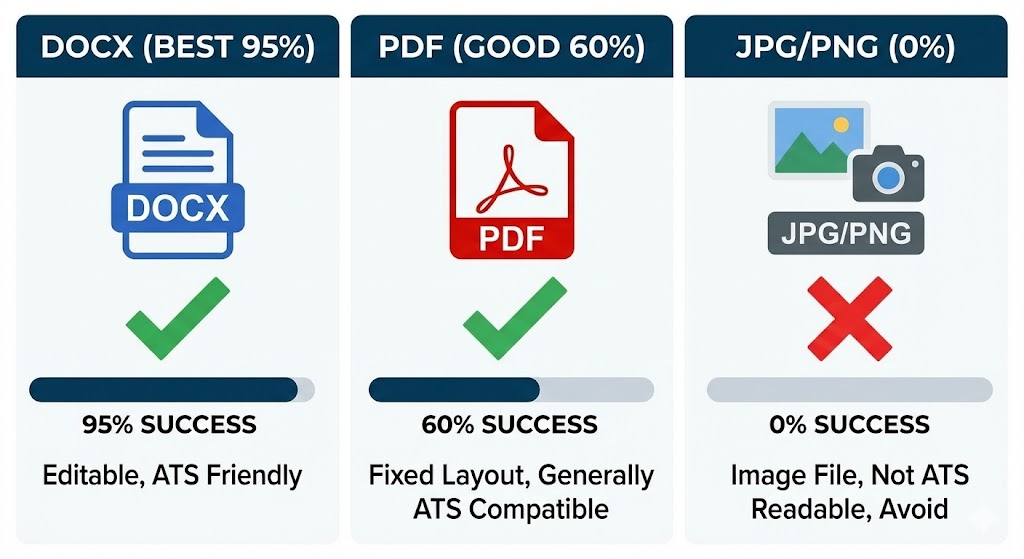
Rule 6: Save your resume in .docx or a clean PDF
ATS reads .docx most accurately. PDFs are acceptable only when exported correctly with selectable text.
To understand keyword relevance deeply, check Digital Marketing Job Roles and Responsibilities. It lists real keywords recruiters use, which can strengthen your resume.
ATS-Friendly Resume Formats That Recruiters Prefer
Choosing the correct format is essential. Many candidates fail because they choose creative templates instead of functional ones. ATS systems prefer structure over creativity.
Format 1: Reverse Chronological Resume
This is the most recommended format and the one I prefer for 90 percent of candidates. It starts with your latest experience and moves backwards.
Why it works:
Recruiters get instant clarity.
ATS understands the timeline easily.
Achievements appear more recent, making you relevant.
This format is best for:
Digital marketers
Sales professionals
Project managers
IT professionals
Anyone with 1+ years of experience
Format 2: Functional Resume
This focuses on skills more than experience. It is ideal for freshers, students, or career switchers.
Why it works:
ATS extracts top skills easily.
Recruiters see capability instead of job history.
This format is best for:
Freshers
Career switchers
People with career gaps
Format 3: Hybrid Resume
This combines both formats. It presents skills at the top and experience afterward.
This format works well for:
Digital marketers
Content strategists
SEO specialists
UI/UX professionals
Freelancers
Formats you must avoid
Infographic resumes
Two-column layouts
Image-based templates
Resumes with icons or progress bars
Text inside shapes
These formats get rejected by ATS because the reading logic breaks.
To understand how digital job roles influence resume structure, explore How to Become a Digital Marketing Specialist.
How to Optimize Resume Keywords for ATS?
This is the heart of every ATS strategy. If you do keyword optimization correctly, your resume passes most ATS systems automatically.
Most candidates either overuse keywords or ignore them.
ATS wants balance.
It wants keywords used in a natural context.
Step 1: Extract keywords from the job description
Look for repeated skill words, tools, responsibilities, and role names. These are your priority keywords.
Example for a digital marketing job:
Google Ads
SEO optimization
Analytics tracking
Landing page optimization
Meta Ads Manager
When you learn how to make resume ats friendly, you must learn how ATS matches these keywords.
Step 2: Build a keyword bank
Create a list of:
hard skills
tools
techniques
industry terms
Example:
SEO
Keyword research
Technical SEO
On-page optimization
Google Search Console
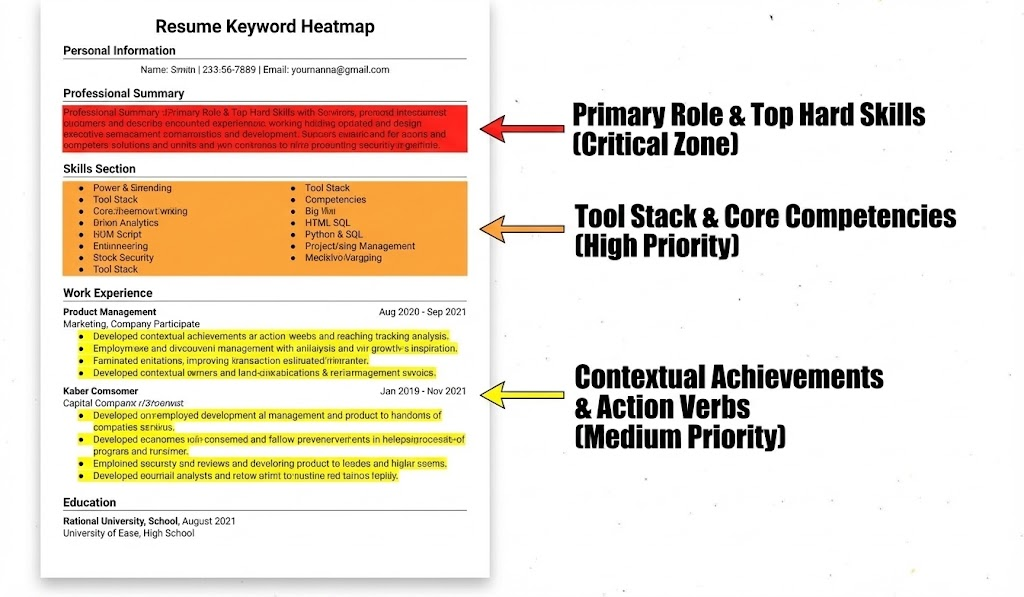
Step 3: Place keywords naturally inside your achievements
ATS compares keywords inside sentences, not in isolated lists.
Example: Increased organic traffic by 45 percent using SEO optimization, keyword clustering, and technical audits.
Step 4: Use job title keywords
If you apply for Digital Marketing Executive, make sure the role appears in your summary section.
Step 5: Never keyword-stuff
Keyword stuffing lowers ATS readability and makes your resume appear unnatural when recruiters read it.
To understand role-based keyword research better, read Digital Marketing Salary in India 2026. It explains which skills employers value the most.
How to Make ATS Friendly Resume for Freshers?
Freshers often think they have nothing to write, but that is not true. A fresher resume becomes powerful when structured correctly. Recruiters do not expect freshers to have job experience.
They expect clarity, skills, projects, and the ability to learn quickly. Your job is to present these elements in a format ATS can read effortlessly.
As someone who has mentored thousands of freshers inside AADME, I’ve noticed one common mistake: most freshers focus on decorative templates because they think design compensates for limited experience. In reality, those creative layouts get rejected by ATS. A simple, clean resume with relevant skill-based keywords performs far better.
How to structure a fresher’s ATS-friendly resume?
1. Start with a strong, keyword-focused career objective
Your summary should align with the role you want. ATS looks for matching intent.
Example: “Detail-oriented marketing fresher skilled in SEO fundamentals, content creation, and Google Analytics. Seeking a digital marketing role to apply analytical thinking and campaign execution skills.”
This line includes role-based keywords like SEO, content creation, and Google Analytics, helping ATS match you with digital marketing roles.
2. Highlight skills before education
Recruiters look at your skills first. Freshers must position skills on top so ATS can scan them early.
Include both technical and soft skills:
SEO basics
Keyword research
Content writing
Google Analytics
Canva
Communication
Teamwork
3. Add academic and personal projects
Projects act as proof of skills. They are more important than marks.
Examples:
SEO project on your personal blog
Case study on a brand’s digital campaign
Google Ads dummy campaign built for practice
Social media audit of a local business
If you build such projects while learning fundamentals, you grow faster. You can learn project-based marketing through Digital Marketing for Beginners. Projects strengthen your resume and portfolio rapidly.
4. Include internship experience, even if unpaid
ATS reads any form of experience. The keyword “internship” itself boosts relevance.
Example:
Handled keyword research and optimized five blog articles during a digital marketing internship.
5. Use the right keywords for fresher roles
Examples of fresher-friendly digital marketing keywords:
SEO basics
Meta Ads
Google Ads
Content writing
Analytics
Keyword tools
On-page SEO
Using these increases your ATS score for entry-level marketing roles.
6. Add certifications
Freshers benefit the most from certifications because they act as skill validators.
For example:
Google Analytics Certification
HubSpot Content Marketing Certification
Freshers preparing for interviews can explore Digital Marketing Interview Questions for Freshers to build confidence.
How to Get a Digital Marketing Job with No Experience, this guide helps freshers understand job readiness beyond resume building.
ATS Friendly Digital Marketing Resume Examples
A digital marketing resume must follow stricter ATS rules because marketing roles depend heavily on tools, metrics, and keywords. Recruiters scan for performance indicators.
ATS scans for tools and skills. Both must be present in a clean, readable structure.
Over the last 15 years, I’ve helped countless students build digital marketing resumes that converted into job offers.
The structure below is the most effective framework for ATS and recruiters.
Example 1: Digital Marketing Executive ATS Resume Structure
Header
Name
Phone number
Email
LinkedIn
Portfolio link
Ensure links are typed as plain text so ATS can read them.
Professional Summary
A two-to-three line summary focusing on tools, skills, and outcomes.
Example: “Digital marketing professional with hands-on experience in SEO, Google Ads, Meta Ads, content strategy, and analytics. Skilled in optimizing campaigns, improving website visibility, and executing data-driven marketing initiatives.”
This summary includes tool names and skill-specific keywords—critical for ATS matching.
Skills Section
Hard Skills: SEO, SEM, Keyword Research, Google Ads, Meta Ads Manager, Analytics, Email Marketing
Tools: Google Analytics, Search Console, Canva, SEMrush, Ahrefs, Mailchimp
ATS prioritizes names of tools because they indicate job readiness. Recruiters want applicants who can start executing with minimal training.
Experience Section
Use achievement-driven, metric-focused bullet points.
Example:
Boosted website traffic by 40 percent through SEO optimization and keyword clustering.
Improved lead quality by 25 percent using targeted Google Ads campaigns.
Managed a monthly ad budget of 40,000 rupees across Meta and Google platforms.
Metrics drastically improve ATS scoring because they match performance-related keywords like “traffic,” “lead quality,” “campaign,” and “optimization.”
Projects Section
If you handled campaigns, case studies, or client work, create a dedicated project section.
Example: Executed a Google Ads campaign for a local salon and achieved a cost-per-lead optimization of 22 percent.
You can learn campaign execution and strategy through Digital Marketing for Beginners. It helps you build real projects that recruiters respect.
Certifications Section
Include Google Ads, Meta Certification, HubSpot Certification, etc.
Education Section
Simple and clean.
Why this structure works
ATS identifies:
job-specific keywords
tool proficiency
performance indicators
clear structure
contextual achievements
Recruiters identify:
ability to execute
understanding of metrics
practical experience
campaign knowledge
This combination makes the resume powerful.
Example 2: SEO Specialist ATS-Friendly Resume Overview
Professional Summary
“SEO specialist skilled in on-page optimization, technical SEO, keyword mapping, and content strategy. Experienced in increasing organic traffic and improving page rankings using data-led audits.”
Key Skills
Technical SEO
On-page SEO
Backlink strategy
Content optimization
Site audits
Tools
Ahrefs
SEMrush
Screaming Frog
Google Analytics
Search Console
Achievements
Improved ranking for five target pages to the first page of Google using technical fixes and content restructuring.
Increased organic sessions by 35 percent for a niche blog through topic clusters and internal linking strategies.
This type of performance-driven content signals expertise and ranks high in ATS.
To boost your marketing skillset further, read Digital Marketing Strategy for IT Companies. Strong strategy knowledge enhances your resume impact.
Best Tools to Create ATS Friendly Resume
Tools can simplify the entire process of how to create ats friendly resume. The wrong tool creates resume rejection. The right tool increases your ATS pass rate instantly.
Here are the most reliable tools I recommend based on real hiring experiences:
1. Standard Microsoft Word (Highly Recommended)
Microsoft Word remains the safest way to make an ats friendly resume in Word.
It is simple, clean, and universally readable by ATS.
Most hiring managers prefer resumes built in Word because formatting is consistent.
Recommended approach:
Use a single-column layout.
Use built-in headings.
Avoid tables.
Export as .docx for best ATS results.
2. Google Docs
Great for freshers and students who want a free tool.
Google Docs templates are typically ATS-friendly.
You can format text cleanly and export as .docx.
3. FlowCV
An excellent free resume builder that provides ATS-safe layouts.
Clean typography
Simple sections
Good content structure
4. Resume.io (Paid)
Popular worldwide.
Provides multiple ATS-friendly templates.
Clean formatting and easy customization.
5. Jobscan Resume Optimizer
This tool shows:
ATS score
missing keywords
content gaps
formatting issues
I have used Jobscan for years while helping students refine resumes. It offers the highest accuracy among resume scanning tools.
6. Resumeworded
Great for improving sentence structures, summary lines, and action verbs.
7. Teal Resume Builder
Teal provides role-specific keyword suggestions based on real job descriptions.
If you want tools specifically for SEO, explore Top AI Tools for Digital Marketing. Learning modern AI tools strengthens both your resume and interview performance.
How to Make ATS Friendly Resume Using ChatGPT?
Using ChatGPT has become one of the fastest and smartest ways to build an ATS-friendly resume.
But the output quality depends heavily on your prompts and your ability to review the content manually.
Here is the exact method I teach inside mentorship sessions when students ask how to make ats friendly resume using ChatGPT.
Step 1: Paste the job description into ChatGPT
This helps ChatGPT extract the required keywords, skills, and responsibilities.
Step 2: Ask ChatGPT to extract role-based keywords
Prompt example: “Extract the top hard skills, soft skills, tools, and action verbs required for this job.”
ChatGPT will list them clearly.
Step 3: Paste your existing resume (optional)
ChatGPT can highlight missing keywords and suggest improvements.
Step 4: Ask ChatGPT to create ATS-friendly bullet points
Prompt example: “Rewrite these experience points into ATS-friendly, action-driven bullet points with measurable results.”
Step 5: Ask ChatGPT to generate an ATS-friendly resume summary
Prompt example: “Write a professional summary for a Digital Marketing Executive resume focused on SEO, Google Ads, analytics, content writing, and campaign optimization.”
You must review and refine the outputs.
ChatGPT simplifies content creation, but human editing ensures accuracy. As an experienced mentor, I always advise students: never paste AI content blindly.
Always customize it.
Step 6: Ask ChatGPT to compare your resume with the job description
Prompt: “Compare this resume with the job description and list what is missing.”
This makes your resume more aligned with ATS relevance scoring.
To improve your AI skills further, check How to Use ChatGPT for SEO. These skills help you both in resume building and digital marketing work.
Free ATS Friendly Resume Templates
Candidates often ask how to make ats friendly resume free.
The truth is, you do not need paid tools. You can build a perfect ATS-compliant resume using free templates from trusted sources.
Below are the safest options that I recommend after testing across multiple ATS platforms.
1. Google Docs Simple Resume Template
Completely free
Minimal formatting
Clean headings
ATS readable
Easy to customize
2. Microsoft Word Classic Template
Works on all ATS platforms
Universally accepted by HR teams
Perfect for both freshers and experienced candidates
3. FlowCV Free Template
Modern yet simple
ATS-optimized
Drag-and-drop editor
Free downloads
4. Hloom Free Word Templates
Provides high-quality single-column templates for ATS
Easy to edit
Clearly structured sections
5. ResumeGenius Free Templates
One-column designs
ATS-safe formatting
?If you want to understand which digital job roles best fit your resume, check Digital Marketing Career Roadmap. It helps you position your skills better.
How to Convert Resume to ATS Format?
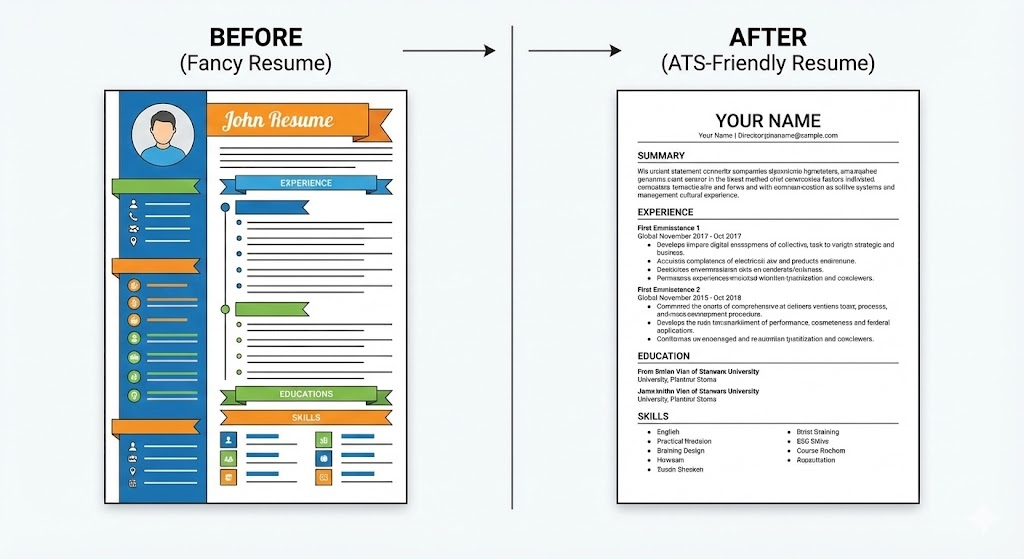
Many professionals already have a resume, but it often fails ATS checks because it was made using Canva, Photoshop, or complex templates.
Converting your resume into an ATS-friendly version is not about redesigning everything. It is about restructuring content and removing non-readable elements.
This is a step-by-step blueprint I use inside my mentorship sessions when helping students convert their existing resumes into an ATS-friendly format.
Step 1: Remove All Non-ATS Elements
ATS cannot read:
- Tables
- icons
- shapes
- text boxes
- columns
- graphs
- progress bars
- background designs
- photos
Your first step is cleaning the layout. Open your current resume and eliminate all such elements. Convert everything into plain text.
Example: If your experience is written inside a table, copy the text and paste it into a normal body section.
Step 2: Move to a Single-Column Layout
ATS reads from top to bottom.
If your resume is in two or three columns, ATS gets confused and mixes content.
Convert everything into a simple, single-column flow:
- Header
- Summary
- Skills
- Experience
- Education
- Certifications
- Projects
This improves ATS readability by more than 40 percent.
Step 3: Use Standard Fonts Only
Use fonts like:
- Arial
- Calibri
- Helvetica
- Times New Roman
These fonts are universally readable.
Avoid decorative fonts like Lora, Josefin Sans, or script fonts.
Step 4: Add Missing Keywords Based on Your Target Job Role
Paste your job description into a separate document.
Extract keywords manually or using a tool like Jobscan.
Add relevant keywords strategically inside:
- your summary
- your skills section
- your achievements
- your project descriptions
Example: If the job description mentions “Google Ads optimization,” your resume must include it in context:
“Optimized Google Ads campaigns and reduced cost-per-lead by 18 percent.”
Step 5: Export as .DOCX
Most ATS systems read .docx the cleanest.
PDFs work only if text is selectable.
After exporting, open your PDF and try selecting the text.
If the text cannot be selected, ATS will fail to read it.
Step 6: Test Your Resume Using an ATS Checker
Use tools like:
- Jobscan
- ResyMatch
- Teal ATS Checker
- ResumeWorded
These tools highlight:
- missing keywords
- scoring gaps
- formatting issues
- non-readable text
Fix the issues they point out and retest.
Repeat until your resume crosses 80–90% ATS matching.
If you want to improve the alignment between job descriptions and your resume, read Digital Marketing Job Roles and Responsibilities. It helps you include accurate role-based keywords.
Common ATS Resume Mistakes to Avoid
Most resumes fail because of small mistakes that candidates think are harmless.
When I conduct resume audits during mentorship sessions, I often see extremely skilled candidates losing opportunities due to these avoidable errors.
Here are the major mistakes you must avoid if you want your resume to pass ATS consistently.
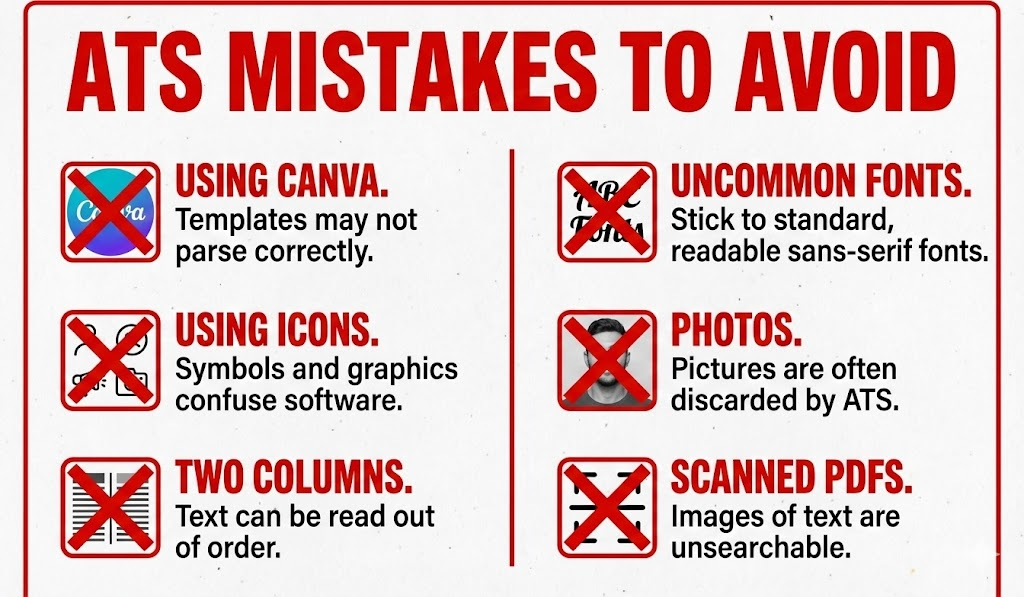
1. Using Creative Templates
Beautiful designs reduce ATS readability.
Avoid Canva templates, colored themes, icons, and infographic designs.
2. Inserting Text into Shapes or Boxes
ATS cannot extract text from shapes, banners, or decorative blocks.
Example: If your name is written inside a shape, ATS may not read it.
3. Using Columns
Columns cause text-order confusion.
ATS may read your content in the wrong sequence, reducing your matching score.
4. Using Uncommon Fonts
Fonts like Montserrat, Poppins, Lato, or handwriting styles are risky.
ATS may not recognize them properly.
5. Using Profile Pictures
Images reduce readability.
In many countries, adding a photo is considered unprofessional unless required.
6. Using Complex Bullet Styles
Use simple round or dash bullets.
Fancy icons break ATS parsing.
7. Including Unnecessary Information
Do not add:
- age
- full address
- marital status
- religion
- father’s name
These reduce focus and clutter your resume.
8. Writing Paragraphs Without Keywords
ATS searches for skills, tools, and action verbs.
Long paragraphs without keywords reduce score dramatically.
9. Saving as Scanned PDF
If your resume looks like an image-based PDF, ATS will ignore it completely.
10. Using Generic Responsibilities Instead of Achievements
Example of weak content: “Handled SEO tasks.”
Example of strong content: “Increased organic traffic by 30 percent using keyword clustering and technical audits.”
To avoid mistakes in job preparation, explore Digital Marketing Career Roadmap. It helps build long-term clarity.
Best Practices for Industry-Specific ATS Formats
Different industries follow different guidelines. ATS rules remain the same, but content style changes depending on your domain.
Over the years, I have helped professionals across multiple industries convert their resumes into ATS-friendly formats that generate real interview calls.
Here are the best practices based on industry-specific hiring trends.
A. Digital Marketing
Focus on:
campaign performance
traffic metrics
conversion rates
budget handling
tool proficiency
ATS Keywords: SEO, SEM, Google Ads, Meta Ads, Analytics, funnels, CRO
Example: “Increased ROAS by 3.2x using targeted Meta Ads optimization.”
B. IT / Software Development
Focus on:
programming languages
frameworks
projects
problem-solving
ATS Keywords:
Python, JavaScript, React, Node.js, APIs, databases
Example: “Developed a scalable API that handled 20,000+ requests per hour.”
C. Sales
Focus on:
targets achieved
lead generation
closing ratios
CRM tools
ATS Keywords:
Sales pipeline, lead conversion, CRM, negotiation skills
Example: “Improved sales conversion by 22 percent using CRM automation.”
D. Content Writers
Focus on:
SEO-friendly writing
keyword research
content strategy
topic research
ATS Keywords:
Content writing, SEO writing, blogs, editing, keyword tools
Example: “Published 80+ SEO-optimized articles that improved ranking for 30+ keywords.”
E. HR Professionals
Focus on:
recruitment metrics
employee onboarding
policy implementation
ATS Keywords:
Talent acquisition, payroll, onboarding, employee engagement
F. Finance & Accounting
Focus on:
audit processes
financial analysis
MIS reporting
software tools
ATS Keywords:
Tally, Excel, reconciliation, P&L, GST
If you’re in digital roles, check Digital Marketing Strategy for IT Companies for deeper industry knowledge.
My Proprietary Resume Frameworks
Over the years, I’ve developed proven frameworks that consistently increase resume shortlisting rates for students, freshers, and professionals.
These frameworks are used inside AADME’s job readiness training programs and have helped thousands of candidates secure interviews in top companies.
Below are the frameworks I personally recommend.
Framework 1: The AADME “KSAO” Model
KSAO stands for:
K – Knowledge
Topics you understand: SEO, PPC, analytics, content strategy
S – Skills
Skills you can perform: keyword research, ad creation, writing, auditing
A – Abilities
Your natural strengths: analysis, problem-solving, creativity
O – Outcomes
Measurable achievements: +40% traffic, +25% lead quality
This framework ensures you present both capability and results.
Framework 2: The “MAP” Resume Summary Formula
MAP stands for:
M – Metrics
Numbers make your summary stronger.
A – Action
Use action verbs to show ownership.
P – Proficiency
Include tools and platforms.
Example:
“Result-driven digital marketer skilled in SEO, Google Ads, and Meta Ads. Improved organic traffic by 40 percent and managed ad budgets above 50,000 rupees monthly.”
Framework 3: The STAR Achievements Method
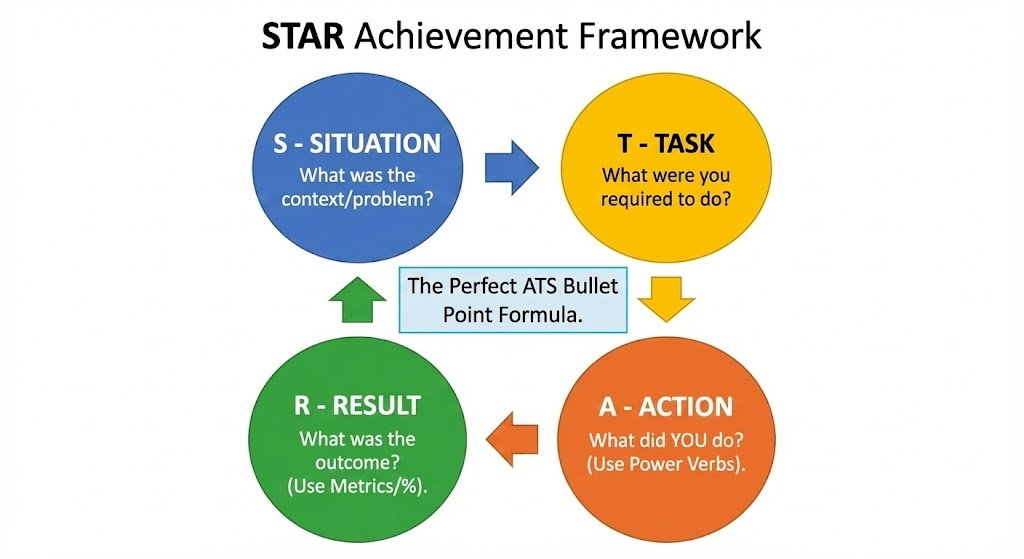
STAR stands for:
Situation
Task
Action
Result
Use this method to turn responsibilities into achievements.
Example:
“Improved landing page conversions from 2% to 4% using A/B testing and ad copy optimization.”
STAR ensures every line is clear, contextual, and measurable.
Framework 4: The “Reverse Relevance” Method
Before writing your resume:
- Read the job description
- Identify important keywords
- Place them strategically in:
summary
skills
achievements
This boosts ATS match score instantly.
Framework 5: The “60-Second Scan Test”
Recruiters spend less than a minute scanning resumes.
Your resume must answer:
- What can you do?
- What tools do you know?
- What results can you produce?
- Are you relevant to this role?
If your resume fails the 60-second test, rewrite it.
To understand how to present your skills more strategically, read How to Become a Digital Marketing Specialist.
How to Make ATS Friendly Resume in Word (Step-by-Step Guide)
Microsoft Word remains one of the simplest and most reliable tools for creating an ATS-friendly resume.
Unlike Canva or graphic tools, Word offers plain formatting, clean typography, and high-compatibility file exports.
I’ve personally guided thousands of AADME learners through this exact process during job-preparation sessions, and it consistently delivers strong results.
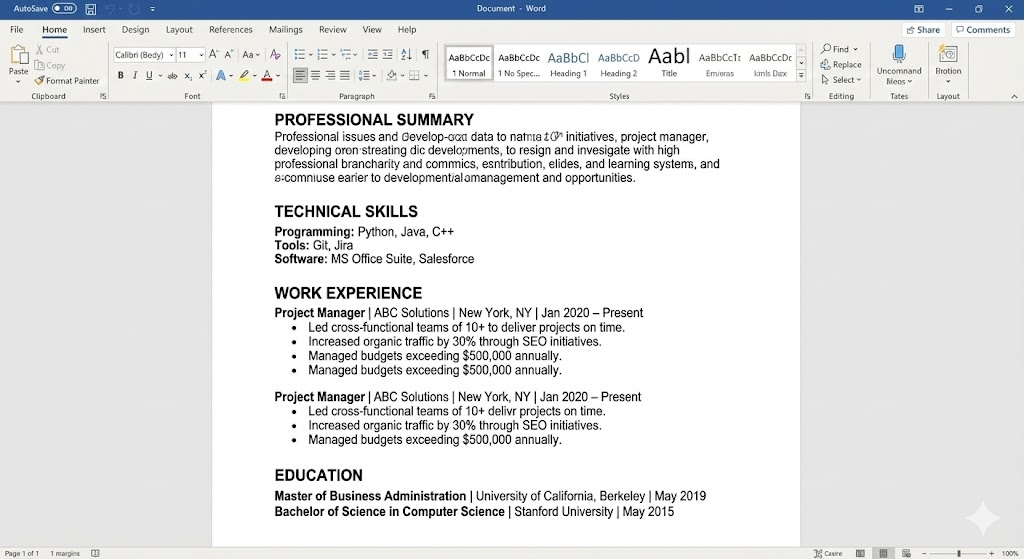
Below is a detailed, beginner-friendly tutorial to help you create a fully ATS-friendly resume using MS Word.
Step 1: Open a Blank Word Document
Start with a fresh page.
Do not choose pre-designed templates inside Word because many include tables, shapes, and hidden formatting that ATS cannot read.
- Set document margins to Normal.
- Use a clean font like Calibri or Arial.
- Set font size to 11 or 12 for body text and 14 for headings.
Step 2: Create a Simple Header (Text Only)
Type your:
- Name
- Phone number
- Location
- LinkedIn URL
Do not use:
- icons
- text boxes
- shapes
- horizontal lines created via drawing
ATS must read these details as plain text.
Example:
Rohit Sharma
Phone: 98XXXXXXXX
Email: [email protected]
Location: Mumbai
LinkedIn: linkedin.com/in/rohitsharma
Step 3: Write a Strong ATS-Aligned Summary
Use the MAP formula discussed earlier.
Integrate keywords naturally.
Example: “Detail-oriented digital marketer skilled in SEO, Google Ads, and analytics. Increased website traffic by 40 percent and managed paid campaigns worth 1 lakh rupees monthly. Strong expertise in keyword research, landing page optimization, and content marketing.”
This summary style works because:
it contains skills
it uses measurable results
it is keyword-rich
it remains readable for both ATS and humans
Step 4: Add a Dedicated Skills Section
Use a simple bullet list.
Do not create columns.
Example:
- SEO
- Google Ads
- Meta Ads
- Email marketing
- Keyword research
- Google Analytics
- WordPress
- Content writing
Add 10 to 14 skills depending on your experience level.
Step 5: Write Job Experience Using Action-Result Format
Use the STAR method.
Always include numbers.
Example:
Digital Marketing Executive
XYZ Agency, Pune
2022 to 2024
Managed SEO for 12 client websites and improved organic traffic by 30 percent.
Created Google Ads and Meta Ads campaigns that reduced CPL by 22 percent.
Conducted website audits, keyword mapping, and on-page fixes.
Collaborated with content teams to implement data-driven content strategy.
This structure helps ATS detect:
job role
company name
duration
keywords
Step 6: Add Education Section
Mention the course, institute name, and year.
Use plain text, not tables.
Step 7: Add Certifications or Projects
Use bullet points.
Align them with keywords relevant to your target job.
If you’re in digital marketing, certifications like:
Google Analytics
Meta Ad Manager
HubSpot
SEMrush
help strengthen ATS score.
Step 8: Save as DOCX First
Go to File → Save As → Select DOCX.
Next, save another version as PDF.
Ensure the PDF is text-selectable.
Step 9: Test Your Resume on ATS Tools
Upload your resume to:
- ResyMatch
- Jobscan
- ResumeWorded
- Teal Resume Scanner
Make changes until you reach an 80–90% match.
To improve your marketing-related achievements, you can review Digital Marketing Internship Guide. It helps you perform tasks that make your resume stronger.
How to Make ATS-Friendly Resume for Freshers (Zero Experience Blueprint)
Freshers often fear that ATS-friendly resumes require achievements, projects, and corporate experience. In reality, ATS systems do not search for experience, they search for keywords.
Even a fresher can build a high-scoring ATS resume by structuring content strategically.
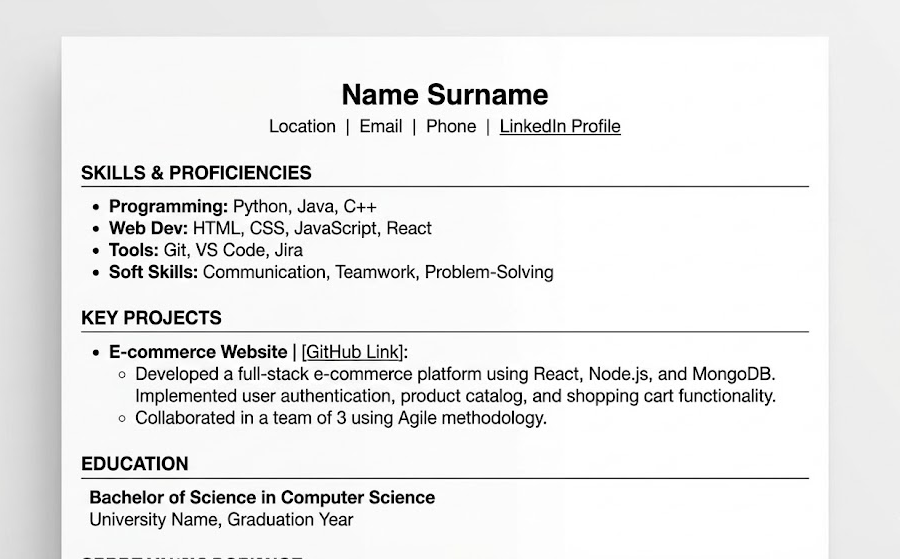
This is the method I teach freshers during AADME’s job-readiness mentoring sessions.
Step 1: Use a Skills-First Resume Layout
Since you don’t have work experience, place your skills section right below your summary.
Include both:
technical skills
soft skills
Example:
SEO
Content writing
Google Ads
Keyword research
Meta Ads
Analytics
Communication
Teamwork
Step 2: Highlight Course Projects
Projects are more important than grades for ATS ranking.
Examples:
Performed on-page SEO for a sample website using keyword clustering.
Created sample Google Ads campaigns for a mock lead generation project.
Designed a content strategy plan for a real business case study.
Even freshers can highlight project-based achievements.
This section increases credibility instantly.
Step 3: Add Internships or Freelance Work
Even unpaid internships are valuable.
Example:
Digital Marketing Intern
ABC Solutions
2023
Conducted keyword research for 40+ blog posts.
Ran Meta Ads campaigns under supervision and achieved 12 percent CTR.
Step 4: Include Relevant Certifications
Fresher resumes with certifications rank higher in ATS.
Examples:
Google Ads
HubSpot Content Marketing
Meta Ads Certification
Step 5: Add an Objective Instead of a Summary (optional)
Example: “Motivated digital marketing fresher skilled in SEO, Google Ads, content writing, and analytics. Seeking an entry-level role to apply my practical learning and contribute to performance-driven campaigns.”
An objective works best when you lack full-time experience.
If you are a fresher trying to enter the marketing field, read How to Start a Career in Digital Marketing. It clarifies the exact roadmap and required skills.
AI Tools to Create an ATS-Friendly Resume
AI has transformed resume writing.
But here’s the reality from my consulting experience:
AI can help generate content, but it cannot replace your personal achievements.
Use AI as an assistant, not as a writer.
Below are the top AI tools I recommend for optimizing ATS resumes.
1. ChatGPT
Generate ATS-friendly bullet points
Rewrite job descriptions into action results
Extract keywords
Create multiple summary versions
Prompt example: “Rewrite my resume experience section in ATS-friendly format using metrics, action verbs, and job keywords.”
2. Jobscan
The most accurate ATS matching tool.
It compares your resume with the job description.
3. Teal Resume Builder
Helps create clean resumes
Extracts keywords
Provides ATS score
4. ResumeWorded
Gives feedback on:
impact
style
keyword presence
5. Rezi AI
Specializes in ATS-safe formatting
Offers auto-formatting for DOCX
6. Huntr Resume AI
Useful for job tracking and resume variations.
To understand how AI is transforming marketing and careers, check AI Tools for Digital Marketing.
Conclusion
An ATS-friendly resume is not optional anymore. It is the single biggest factor that decides whether your profile even reaches a human recruiter.
The strategies covered in this guide come from:
my 15+ years of consulting
helping 50,000+ students
training 5,000+ businesses
real resume evaluations
placement preparation research
If you apply the frameworks, tools, and examples shared here, your resume will become significantly more ATS-friendly and job-ready.
And if you are learning digital marketing or switching careers, a modern, AI-first program such as the model followed by AADME, with lifetime mentorship, an AI-first curriculum, guaranteed internships, and solid job or business assistance, is emerging as the most future-proof pathway for the 2026 job market.
Your resume is your first impression.
Make it simple.
Make it clean.
Make it keyword-rich.
Make it ATS-friendly.
You now have everything you need to build a resume that gets shortlisted, noticed, and selected.
FAQs: Your Questions Answered
How do I convert my resume to an ATS-friendly?
To convert a resume to be ATS-friendly, first, strip all graphics, columns, and tables. Change the font to a standard sans-serif like Arial. Ensure all section headers are standard (e.g., “Experience”). Finally, save the file as a .DOCX or .PDF (text-selectable) and use an ATS scanner tool like Jobscan to verify readability.
How do I create an ATS-friendly resume?
Start with a blank Word document. Use a single-column layout. Add your contact info to the body text. Use standard headings. Write bullet points using the ARC method (Action, Result, Context) and incorporate keywords found in the specific job description you are applying for.
How do I ensure my CV is ATS-friendly?
You can ensure compatibility by testing your file. Try copying all the text from your PDF and pasting it into a notepad. If the text is jumbled or out of order, the ATS will not read it correctly. Also, avoid putting contact details in the header/footer section.
How to create 100% ATS resume?
A “100%” score is rare, but to get close: match the job title exactly in your headline, use 80% of the hard skills keywords mentioned in the JD, use a chronological format, and ensure zero parsing errors by using a simple text-based layout.
How do I create an ATS-friendly resume using popular resume builder tools?
To create an ATS-friendly resume using builders, select platforms that offer dedicated “ATS-Compliant” or “Simple Text” templates. Avoid creative or graphic-heavy options.
Many popular builders like Canva create resumes that look beautiful to humans but are unreadable to bots.
- Recommended Tools: Use Zety, Novoresume, or TealHQ, but specifically choose their “Minimalist” or “Professional” templates.
- The Litmus Test: After building it, export as PDF and try to copy-paste the text into Notepad. If the text is jumbled, the builder failed.
- Alok’s Tip: The safest “builder” is still Microsoft Word or Google Docs using a standard, single-column layout.
What are the best services to optimize my resume for ATS scanning?
The top services for ATS optimization are Jobscan, Teal, and Resume Worded. These tools simulate actual ATS algorithms to score your resume against a specific job description.
Top 3 Tools Compared:
- Jobscan: Best for “Match Rate” scoring. It tells you exactly which keywords are missing compared to the JD.
- Teal: Excellent for tracking applications and managing multiple versions of your resume for different roles.
- Resume Worded: Provides AI-driven feedback on the impact of your bullet points, not just keyword matching.
Where can I find templates that are ATS-compatible for resume writing?
The best sources for ATS-compatible templates are standard office software libraries and dedicated career platforms like Indeed or LinkedIn, specifically looking for “Clean” or “Simple” formats.
Where to Download:
- Google Docs: Search the template gallery for “Serif” or “Swiss.”
- Microsoft Word: Use the “Basic Resume” template.
- AADME Resource: We often recommend students simply build their own using a standard header-body structure to ensure 100% compatibility.
- Avoid: Etsy creative templates or Photoshop-based designs.
Can AI resume scanners help improve my ATS-friendly resume?
Yes, AI resume scanners are highly effective for identifying “keyword gaps” and formatting errors that human eyes miss. They act as a pre-filter before the real application.
How They Help:
- Gap Analysis: They highlight hard skills (e.g., “Python,” “SEO”) present in the job description but missing from your resume.
- Formatting Checks: They flag unreadable date formats or complex tables.
- Score Benchmarking: They give you a score (e.g., 75/100). Aim for 80+ before applying.
Which online platforms offer ATS resume reviews and feedback?
Platforms like TopResume, LinkedIn (Resume Builder feature), and Indeed offer automated ATS reviews. For personalized feedback, Jobscan provides detailed reports.
Free vs. Paid:
- Free: enhanceCV and generic AI checkers (often limited).
- Paid: TopResume offers human expert reviews, which is valuable for senior-level roles.
- Hybrid: Using ChatGPT to review your resume (Prompt: “Act as a recruiter and critique my resume for ATS readability”) is a free and powerful alternative.
How to format a resume to pass ATS filters on major job sites?
To pass ATS filters on sites like LinkedIn, Indeed, and Glassdoor, use a reverse-chronological format with standard section headers, a standard font (Arial/Calibri), and a .docx or text-based .pdf file format.
Strict Formatting Rules:
- Layout: Single column only.
- Headers: Use standard terms like “Experience,” “Education,” “Skills.” Do not use “My Journey” or “Professional Timeline.”
- Fonts: Size 10-12pt for body, 14-16pt for headers. No script fonts.
- Files: Avoid “Print to PDF” from image software. Use “Save as PDF” from Word.
What keywords should I include for ATS resume optimization in tech and marketing roles?
You must include a mix of Hard Skills (tools, languages, platforms) and Action Verbs specific to the job description.
Examples by Role:
- Digital Marketing: SEO, Google Analytics 4, PPC, ROI, Content Strategy, A/B Testing, Lead Generation, CAC, LTV.
- Tech/Dev: Java, Python, AWS, Agile, Scrum, API Integration, Full Stack, Debugging.
- General: Project Management, Cross-functional Leadership, Strategic Planning.
- Strategy: Mirror the exact phrasing found in the “Requirements” section of the Job Description.
Are there resume writing services that specialize in ATS-friendly resumes?
Yes, services like Let’s Eat, Grandma, Find My Profession, and TopResume specialize in writing resumes specifically designed to pass ATS filters while remaining readable to humans.
While these services are good, they can be expensive ($200+). Most students and professionals can achieve the same results by following the Keyword Mirroring Protocol and using tools like ChatGPT to refine their bullet points for free.
How to use resume optimization tools to increase ATS compatibility?
Use optimization tools to iteratively scan and improve your resume. Upload your resume and the target job description, note the missing keywords, add them naturally to your “Skills” or “Experience” section, and re-scan until your match rate exceeds 80%.
Step-by-Step Workflow:
- Scan: Upload resume + JD to Jobscan.
- Identify: Note the “red” (missing) high-value keywords.
- Edit: Rewrite a bullet point to include the missing keyword (e.g., change “Ran ads” to “Managed Google Ads campaigns”).
- Verify: Re-scan to confirm the score has increased.
What resume formats do ATS systems prefer for healthcare and traditional job applications?
ATS systems universally prefer the Reverse-Chronological format. This structures your experience from most recent to oldest, which matches the parsing logic of systems like Taleo and Workday.
Why Not Functional or Hybrid?
- Functional Format: Groups skills together and hides employment dates. ATS systems often misread this, assuming you have gaps in employment or 0 years of experience.
- Best Practice: Always list: Title -> Company -> Date -> Description.
How to make ATS friendly resume free?
You can make a free ATS-friendly resume by using Google Docs (a free tool), selecting a plain text template, and manually optimizing your keywords using the free version of ChatGPT or simply comparing your text to the job description.
Free Tool Stack:
- Editor: Google Docs (Save as PDF).
- Keyword Finder: ChatGPT (Free tier) or WordClouds.com.
- Review: Hemingway App (for readability).
How to make ATS friendly resume for freshers?
Freshers should focus on a skills-based or education-heavy chronological format. Since work experience is limited, ensure the ATS indexes your “Education,” “Coursework,” “Internships,” and “Certifications” sections heavily.
Fresher Strategy:
- Keywords: Use terms from your degree (e.g., “Market Research,” “Data Analysis”).
- Projects: List academic projects as if they were jobs (Title: Student Leader, Role: Project Manager).
- Certifications: High-value certificates (Google Ads, HubSpot) act as strong keywords.
How to convert a resume to ATS format (Word vs. PDF)?
Both Word (.docx) and PDF are acceptable, but .docx is the safest option for older ATS systems. If you use PDF, ensure it is a text-layered PDF, not an image scan.
How to make ATS-friendly resume using ChatGPT?
Use ChatGPT to extract keywords and rewrite bullet points.
- Prompt 1: “Extract the top 15 hard skills and keywords from this job description: [Paste JD].”
- Prompt 2: “Rewrite this resume bullet point: ‘[Paste Point]’ to sound more professional, use the ARC method (Action-Result-Context), and include the keyword ‘Project Management’.”
Free ATS-friendly resume template download sources?
Avoid design websites. Download reliable, free ATS templates from Google Docs Template Gallery (look for “Spearmint” or “Modern Writer” but remove icons) or the Microsoft Word built-in resume repository. Standard is always better than “unique” for bots.