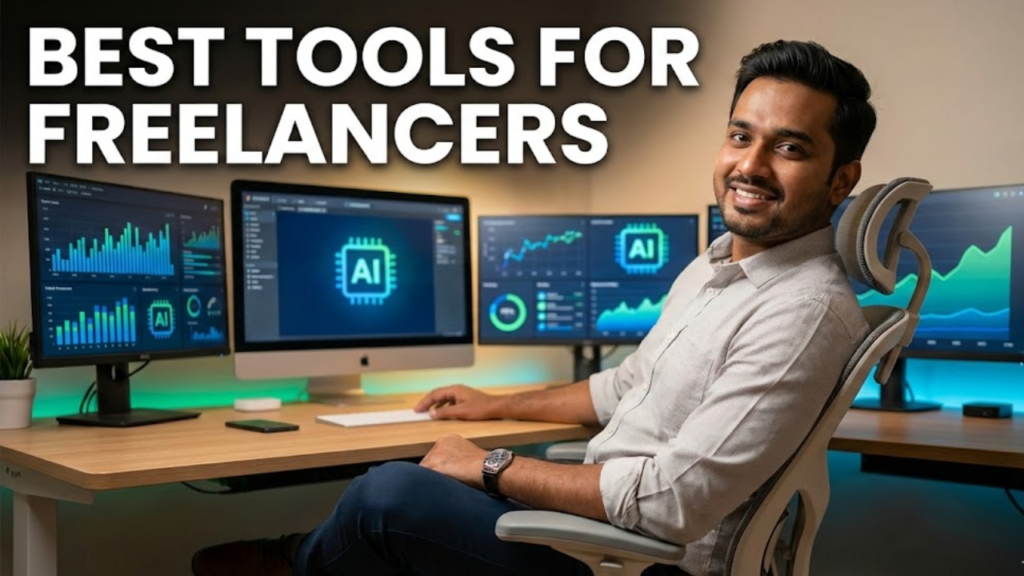
Freelancing in 2026 is no longer about talent alone. Choosing the best tools for freelancers has become the single biggest growth lever for income, productivity, and client retention.
Today, freelancers compete globally, manage multiple clients, and deliver faster than ever. However, most freelancers still rely on outdated software, disconnected apps, and manual workflows. As a result, burnout increases while income stagnates.
The opportunity is massive. AI tools for freelancers, automation-first platforms, and integrated freelancer management tools now allow solopreneurs to operate like lean agencies.
Those who adopt the best software for freelancers build predictable income systems. Meanwhile, others remain stuck chasing deadlines. This guide closes that gap with a proven, system-first approach.
If you are in a hurry, here is the “Golden Stack” I recommend for maximum scalability and profit this year.
| Category | Recommended Tool | Best For | Standout “2026” Feature |
| Project Management | ClickUp | Complex workflows | AI-native task summarization |
| Client Management | HubSpot CRM | Scaling to an agency | Integrated marketing automation |
| Finance/Invoicing | Zoho Invoice | Indian Freelancers | Automated GST-compliance |
| Content & Strategy | ChatGPT Plus | All-in-one execution | Custom GPTs for specific niches |
| Efficiency | Loom | Reducing meetings | AI-generated video transcripts |
In my experience consulting with 5,000+ freelancers and digital businesses globally, the right tool stack consistently separates high earners from struggling professionals.
This guide is designed to help you make informed choices, not emotional ones.

How Freelancing Has Evolved in 2026 (From Hustle to Systems)
Freelancing in 2026 demands integrated software ecosystems, not scattered apps. Successful freelancers rely on AI-driven project management, automated invoicing, smart CRMs, and cloud collaboration tools. System-led freelancers outperform talent-only freelancers consistently.
Freelancing has shifted dramatically.
The old way? Grinding for 12 hours and hoping for a gig. The 2026 way? Building systems that work while you sleep.
Today, successful freelancers don’t just work; they operate as micro-businesses.
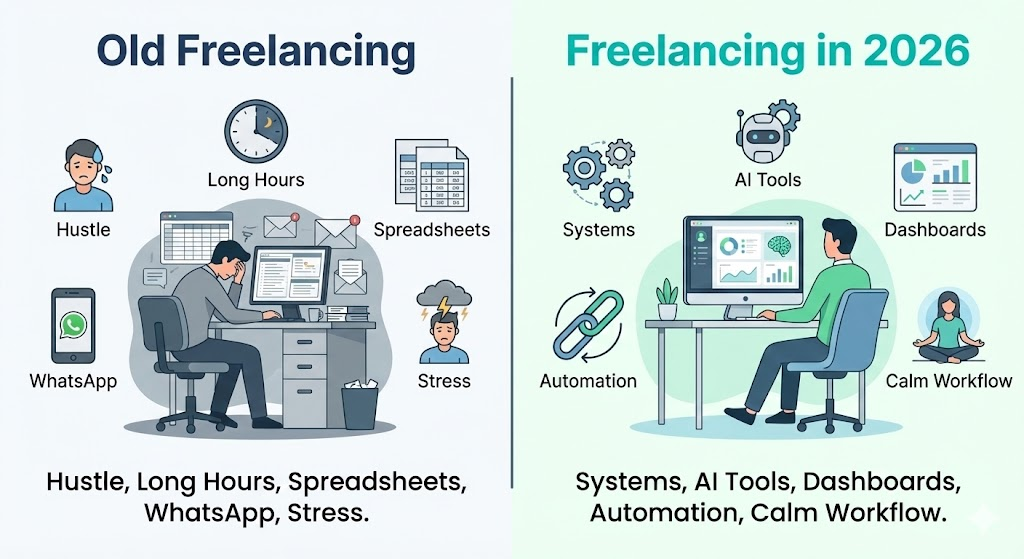
They use structured tools for freelancers that automate decisions, not just tasks. This shift has reduced operational chaos while increasing billable output.
The solopreneur economy now rewards systems thinking. AI-native workflows, centralized dashboards, and real-time analytics have replaced manual follow-ups.
Freelancers who adopt project management software for solopreneurs gain clarity across timelines, priorities, and client expectations. As a result, they deliver consistently without constant firefighting.
Most beginners get this wrong by focusing only on skill improvement. Skills matter, but systems compound faster. Without proper software for freelancers, even top talent hits a growth ceiling.
That ceiling usually appears after three to five clients.
Another major change involves client expectations. Clients now expect faster communication, transparent progress tracking, and automated billing.
Freelancers using outdated tools appear unprofessional. Meanwhile, those using modern freelancer management tools build trust instantly.
If you are serious about long-term freelancing, you must stop thinking like a worker. You must think like an operator.
The FREELANCER-OS™ Framework (The Tool Stack That Actually Scales)
The FREELANCER-OS™ Framework is a five-layer system covering client acquisition, project execution, finance automation, productivity, and AI augmentation. Freelancers using structured stacks grow faster and avoid burnout.
After analyzing thousands of freelancer workflows, I developed the FREELANCER-OS™ Framework. This framework removes guesswork and replaces tool overload with purpose-driven selection. Every tool must serve revenue, efficiency, or scale.
Most freelancers collect apps emotionally. They download tools without integration. Eventually, productivity collapses. FREELANCER-OS™ fixes this by assigning each tool a business role.
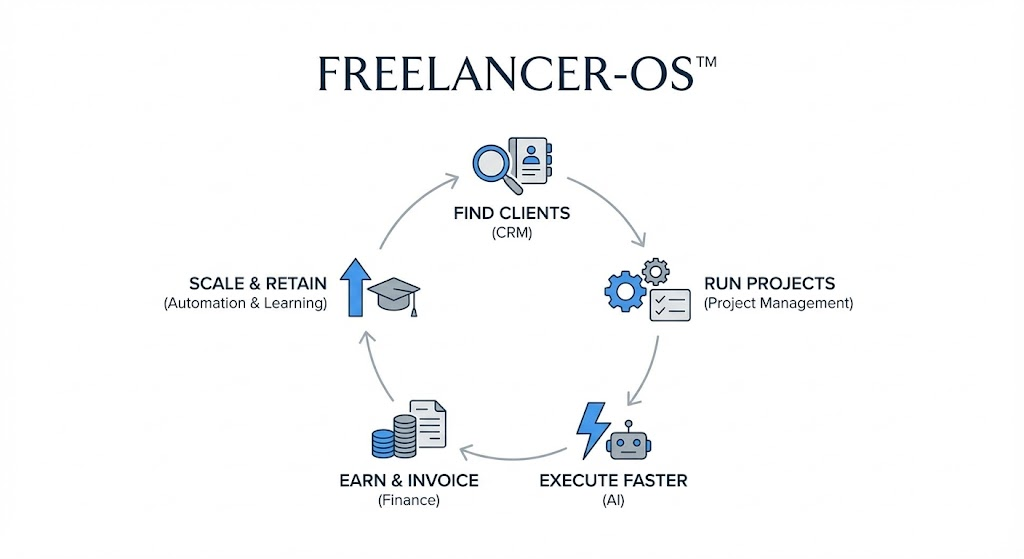
FREELANCER-OS™ Framework Breakdown
| Layer | Purpose | Tool Category |
| F | Find Clients | CRM, Outreach Tools |
| R | Run Projects | Project Management Software |
| E | Execute Faster | AI Tools |
| E | Earn & Invoice | Accounting & Payments |
| LANCER | Scale & Retain | Automation, Analytics, Learning |
Each layer connects logically. For example, your CRM should sync with invoicing software. Your project tool should integrate time tracking. Without integration, tools increase friction.
In my experience, freelancers implementing this framework increase income stability within 90 days. They also reduce decision fatigue significantly. This is not a theory. It is an execution-backed strategy.
You can see similar system-based thinking in career-focused guides like How to Start a Digital Marketing Agency in 2026, which emphasizes structure over hustle.
How to Choose Tools for Freelancers Without Overcomplicating Your Stack?
Choosing tools should feel strategic, not overwhelming. Unfortunately, most online lists ignore context. They recommend tools without considering freelancer’s maturity levels.
As a result, beginners overpay while advanced freelancers underutilize power features.
Always evaluate tools using three criteria: scalability, automation, and integration. If a tool cannot grow with you, avoid it. If it requires manual effort repeatedly, replace it.
If it cannot connect with other tools, eliminate it.
Another mistake freelancers make involves free tools. Free accounting software for freelancers works initially. However, it often lacks compliance, automation, and reporting. This creates long-term financial blind spots.
Instead, build your stack progressively. Start lean. Upgrade intentionally. Avoid shiny-object syndrome.
This approach mirrors how professionals grow in digital careers, as explained in
👉Digital Marketing Career Roadmap for Beginners 2026
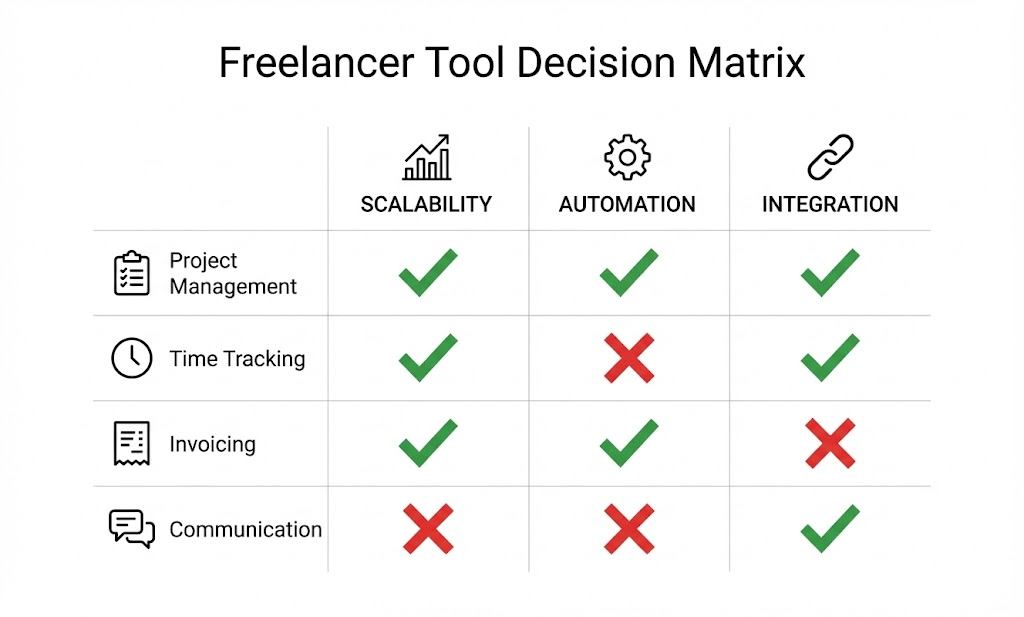
Why Systems Beat Platforms for Freelancers in 2026?
Freelance platforms still matter. However, dependency is dangerous. Platforms control visibility, pricing, and policies. Systems give you control. Tools allow you to own relationships, data, and cash flow.
CRM systems, email workflows, and portfolio platforms reduce platform dependency. Over time, freelancers with owned systems command better rates. They also retain clients longer.
This shift mirrors trends seen across digital marketing and AI-led careers. Those who build assets win. Those who rent attention struggle.
If freelancing is your long-term plan, system-building is non-negotiable.
Best Project Management Software for Solopreneurs
Choosing the best tools for freelancers starts with project management. In 2026, freelancers managing even two clients without proper systems face missed deadlines, scope creep, and mental overload.
The right project management software transforms chaotic to-do lists into structured delivery pipelines. This is not optional anymore. It is operational hygiene.
Modern project management software for solopreneurs is no longer about task lists alone. It now includes AI prioritization, real-time collaboration, client visibility, and performance insights.
Freelancers using advanced tools complete work faster while maintaining quality. Meanwhile, those relying on WhatsApp messages and spreadsheets struggle to scale.
In my experience consulting with freelancers across marketing, design, and development, poor project management is the hidden reason behind burnout. Once you solve this, focusing on how to get freelance digital marketing projects becomes much easier because you actually have the capacity to deliver them. Not workload. Not clients. System failure causes exhaustion.
System failure causes exhaustion.
What Makes a Project Management Tool Ideal for Freelancers in 2026?
The best project management software for freelancers combines task automation, client collaboration, time tracking, and AI-powered prioritization. Tools without integration and automation slow delivery and reduce profitability.
A freelancer-focused project management tool must adapt to multiple client workflows. Each client operates differently. Therefore, flexibility matters more than complexity. Tools should allow custom views, templates, and automation rules.
Client collaboration is another non-negotiable feature. Freelancers waste hours explaining progress through emails. Tools that allow shared dashboards eliminate this friction.
Clients see updates instantly, reducing unnecessary calls.
AI-driven prioritization has become a major advantage. These systems analyze deadlines, workload, and dependencies. As a result, freelancers make smarter daily decisions.
This is especially valuable when handling overlapping projects.
Finally, integration matters. Your project tool must connect with time tracking, invoicing, and CRM systems. Without this, data silos form quickly.
Top Project Management Tools for Freelancers and Solopreneurs
| Tool | Best For | Key Strength |
| ClickUp | Scaling freelancers | AI task automation |
| Notion | Flexible workflows | Custom dashboards |
| Trello | Beginners | Simple Kanban boards |
| Asana | Client collaboration | Timeline clarity |
ClickUp stands out for advanced freelancers. It combines automation, time tracking, and client access. Notion works well for freelancers who prefer flexibility and documentation.
Trello suits beginners but lacks advanced analytics. Asana balances structure and collaboration effectively.
Most beginners get this wrong by choosing overly complex tools early. Start simple. Upgrade when workflow complexity increases.
You can see similar system-driven execution principles discussed in
👉How to Start a Digital Marketing Agency in 2026
Common Project Management Mistakes Freelancers Must Avoid
Many freelancers confuse activity with productivity. They add tasks without prioritization. Over time, this creates clutter. Effective project tools enforce clarity.
Another mistake involves using one board for all clients. This reduces visibility. Separate client spaces improve focus and accountability.
Freelancers also fail to review project data. Tools provide insights on delays and workload. Ignoring analytics wastes valuable optimization opportunities.
Strong project management systems protect your time. Weak systems steal it silently.
The Expert Verdict: While Notion is great for aesthetics, ClickUp is the undisputed winner for 2026. Its ability to integrate time-tracking, billing, and AI-prioritization into one screen makes it the only choice for freelancers who want to stop “app-switching” and start scaling.
Best CRM for Freelancers Managing Multiple Clients
After project management, CRM becomes the next critical layer in choosing the best tools for freelancers. Once you handle more than three clients, memory-based follow-ups collapse. A CRM replaces mental tracking with reliable systems. This is where most freelancers lose revenue unknowingly.
CRM tools for freelancers are not just for sales. They manage conversations, proposals, follow-ups, and renewals. Without CRM software, freelancers forget leads, delay responses, and miss upsell opportunities.
In my experience consulting with 5,000+ service professionals, freelancers without CRMs lose 20–30% potential revenue annually. Not due to skill gaps. Due to neglect.
What a Freelancer CRM Must Do in 2026?
The best CRM for freelancers tracks leads, automates follow-ups, stores client history, and forecasts income. Spreadsheets fail beyond three clients and limit scalability.
A freelancer CRM must be simple yet powerful. Over-engineered enterprise CRMs overwhelm solopreneurs. Freelancer-focused CRMs offer clean pipelines and automation without complexity.
Automation is the biggest advantage. Email reminders, proposal follow-ups, and onboarding sequences save hours weekly. As a result, freelancers focus on billable work.
Revenue forecasting is another underrated feature. CRMs show expected income based on deal stages. This helps freelancers plan workloads and expenses confidently.
Most importantly, CRM systems centralize communication. Every email, call, and note stays organized. This prevents embarrassing client lapses.
Best CRM Tools Designed for Freelancers
| CRM Tool | Best Use Case | Strength |
| HubSpot CRM | Growing freelancers | Free core features |
| Zoho CRM | Indian freelancers | Affordable automation |
| Bonsai | Freelancers | All-in-one client management |
HubSpot CRM works well for freelancers transitioning into agencies. Zoho CRM suits Indian freelancers needing cost-effective automation. Bonsai integrates contracts, invoices, and CRM into one system.
Avoid using spreadsheets as CRM replacements. They fail at reminders, automation, and scalability.
This structured client management mindset aligns with career-growth strategies discussed in
👉Unrevealing Benefits of LinkedIn for Freelancers
Why Freelancers Lose Clients Without a CRM?
Clients rarely leave due to pricing. They leave due to neglect. Missed follow-ups, slow responses, and forgotten conversations erode trust gradually.
CRMs eliminate this risk. They act as memory extensions. Freelancers who adopt CRMs appear professional instantly.
Most beginners delay CRM adoption unnecessarily. That delay becomes expensive over time.
If you want a predictable income, CRM is not optional. It is foundational.
The Expert Verdict: If you are a freelancer in India, skip the western-centric CRMs. Zoho CRM is the best choice because it handles Indian payment gateways and local tax structures more fluently than HubSpot, at a fraction of the cost.
Invoice Generator & Accounting Software for Freelancers (India-Focused)
Selecting the best tools for freelancers becomes incomplete without addressing invoicing and accounting. In 2026, freelancers are no longer paid casually. Clients expect professional invoices, automated reminders, and tax-ready records. Without proper invoice generators for freelancers, cash flow becomes unpredictable and stressful.
Many freelancers still create invoices manually. This approach leads to delayed payments, missing details, and compliance risks. Modern software for freelancers automates the entire billing lifecycle.
From invoice creation to payment reminders, everything runs without follow-ups.
In my experience working with Indian freelancers, accounting issues cause more anxiety than workload. GST errors, expense mismanagement, and tax confusion quietly erode profitability.
The right tools eliminate these risks.
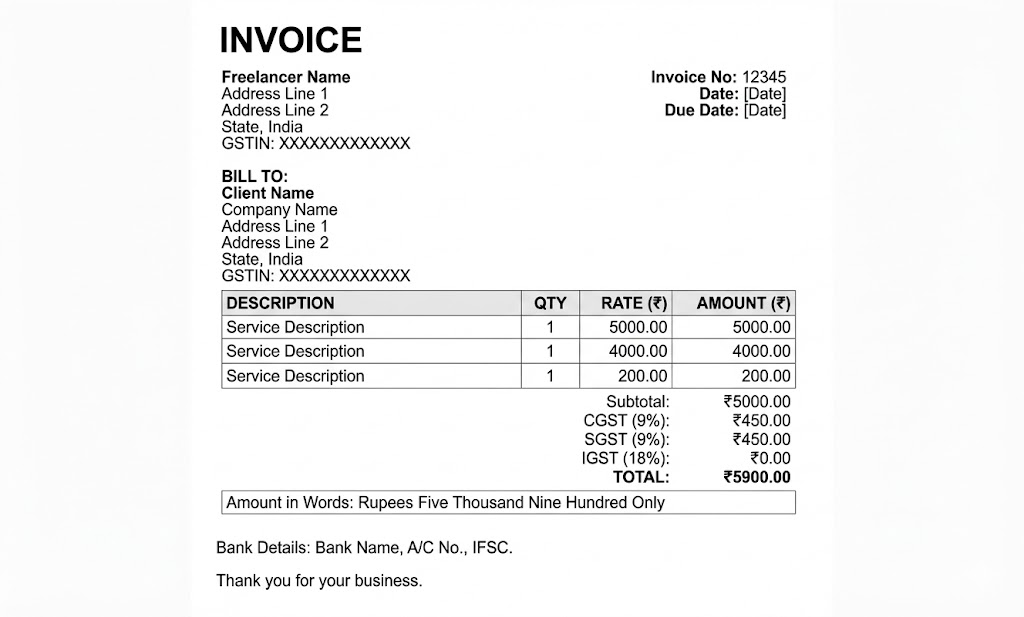
What Makes an Invoice Generator Ideal for Freelancers in 2026?
The best invoice generator for freelancers automates billing, tracks payments, sends reminders, and integrates with accounting systems. Manual invoicing reduces cash flow and increases compliance risk.
An ideal invoice generator should create branded invoices instantly. It must support multiple currencies, payment gateways, and recurring billing. These features matter more as freelancers work globally.
Automation is critical. Tools that send reminders automatically improve payment timelines. Freelancers no longer need to chase clients. Instead, systems do the follow-up politely and consistently.
Invoice tools must integrate with accounting software. Without integration, freelancers duplicate work. That duplication increases error rates and wastes time.
Finally, analytics matter. Knowing which clients pay late allows freelancers to renegotiate terms confidently.
Best Invoice Generators for Freelancers in India
| Tool | Best For | Key Advantage |
| Zoho Invoice | Indian freelancers | GST-ready invoicing |
| FreshBooks | Global clients | Automated reminders |
| Bonsai | Freelancers | Contracts + invoices |
Zoho Invoice stands out for Indian freelancers. It supports GST, recurring invoices, and payment tracking. FreshBooks works well for international clients needing clean automation. Bonsai simplifies contract-to-invoice workflows.
Most beginners underestimate invoice professionalism. However, invoices influence client trust. A clean invoice signals reliability. Furthermore, having a clear system allows you to refine how to charge for digital marketing services in India without hesitation. For freelancers building client credibility, this mindset aligns with high-ticket retention.
However, invoices influence client trust. A clean invoice signals reliability.
For freelancers building client credibility, this mindset aligns with
👉How to Get Web Design Clients Who Pay ₹40,000+
Free Accounting Software for Freelancers: What Works and What Fails
Free accounting software for freelancers works only at the early stages. It lacks automation, reporting, and compliance support needed for long-term growth.
Free accounting tools attract beginners. However, they often lack advanced reporting, GST compliance, and automation. As income grows, limitations appear quickly.
Accounting software should track expenses, categorize income, and generate tax reports. Manual bookkeeping increases audit risks. Automation reduces errors.
Indian freelancers must also manage GST filings, TDS, and expense documentation. Without proper tools, compliance becomes stressful.
Free tools are acceptable initially. However, freelancers should upgrade once income stabilizes.
Best Accounting Software for Freelancers in India
| Software | Best Use | Strength |
| Zoho Books | Indian freelancers | GST compliance |
| Vyapar | Small businesses | Offline support |
| Wave | Beginners | Free basic accounting |
Zoho Books remains the most balanced solution for Indian freelancers. It offers automation, GST filing support, and analytics. Vyapar suits freelancers preferring offline workflows. Wave works for beginners without GST obligations.
Accounting clarity supports long-term career stability. This mirrors broader financial planning discussed in
👉7 FASTEST Ways on How to Make Money With Digital Marketing
Why Freelancers Struggle With Payments Without Accounting Systems?
Late payments damage mental focus. They create uncertainty and resentment. Proper accounting systems prevent this silently.
Automated reminders maintain professionalism. Clear records support legal protection. Organized finances build confidence during negotiations.
Freelancers without accounting systems work harder for less. Those with systems scale calmly.
AI Tools for Freelancers That Replace 3 Human Roles
Choosing the best tools for freelancers in 2026 requires a serious focus on AI adoption. AI tools for freelancers are no longer optional productivity boosters. They have become income multipliers. Freelancers using AI complete work faster, deliver higher quality, and handle more clients without burnout.
Many freelancers still treat AI as a content toy. This is a costly mistake. In reality, AI now replaces research assistants, junior creators, and operations support.
As a result, freelancers who integrate AI correctly outperform their peers significantly.
In my experience consulting with AI-first businesses, freelancers using AI earn more per hour. They also reduce revision cycles. This advantage compounds monthly.
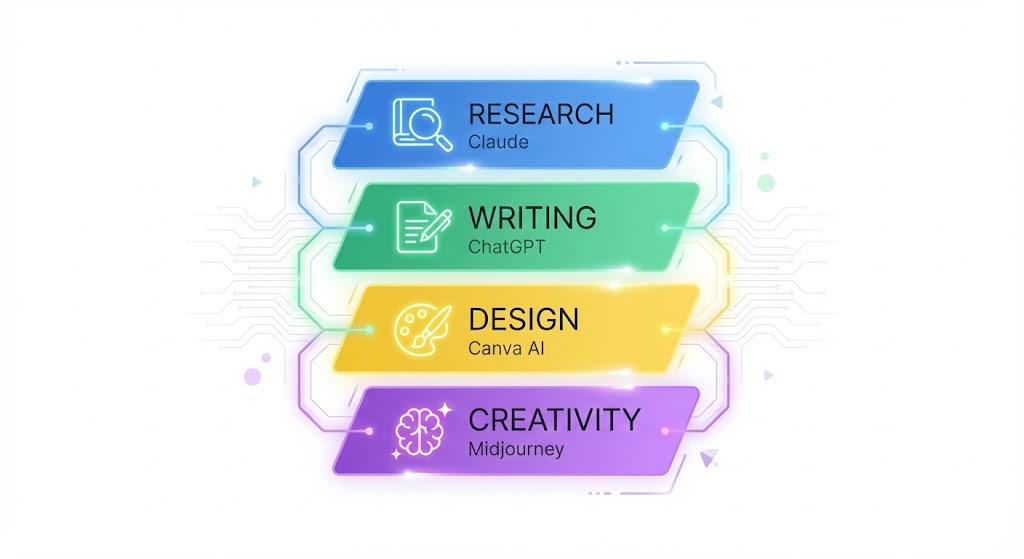
How AI Tools Create Real Leverage for Freelancers?
AI tools for freelancers automate research, content creation, design, and workflow decisions. Used correctly, AI replaces at least three human roles and increases profit per hour.
AI tools remove repetitive cognitive work. Research, drafting, ideation, and formatting happen faster. This frees freelancers to focus on strategy and delivery.
AI also improves consistency. Tools follow brand tone, formatting rules, and quality standards reliably. This reduces client complaints.
Another advantage involves speed. Faster turnaround increases perceived value. Clients pay more for responsiveness, not effort.
However, most beginners misuse AI. They generate raw outputs without refinement. This damages credibility. AI must assist, not replace judgment.
Best AI Tools for Freelancers in 2026
| AI Tool | Use Case | Key Benefit |
| ChatGPT | Writing & strategy | Multi-role assistant |
| Claude | Research & analysis | Long-context reasoning |
| Canva AI | Design | Fast visual creation |
| Midjourney | Creative assets | High-quality visuals |
ChatGPT remains the most versatile AI tool. It supports ideation, planning, and execution. Claude excels at research-heavy tasks. Canva AI empowers non-designers. Midjourney suits creative freelancers.
Used together, these tools form a powerful AI stack.
You can explore deeper AI adoption strategies in
👉35+ AI Tools for Digital Marketing Every Marketer Needs in 2026
Common AI Mistakes Freelancers Must Avoid
Many freelancers copy AI outputs blindly. This reduces originality. Clients notice quickly.
Another mistake involves ignoring prompts. Poor prompts produce poor results. Skilled freelancers invest time in prompt engineering.
Freelancers also fail to build AI workflows. Isolated AI use limits leverage. Integrated workflows unlock scale.
AI is not magic. It is a multiplier for disciplined systems.
The Expert Verdict: Don’t just use AI to write. Use Claude 3.5/4 for deep research and ChatGPT for operational automation. Stacking these two gives you a “Digital Co-Founder” rather than just a chatbot.
Time Tracking & Productivity Tools That Actually Increase Income
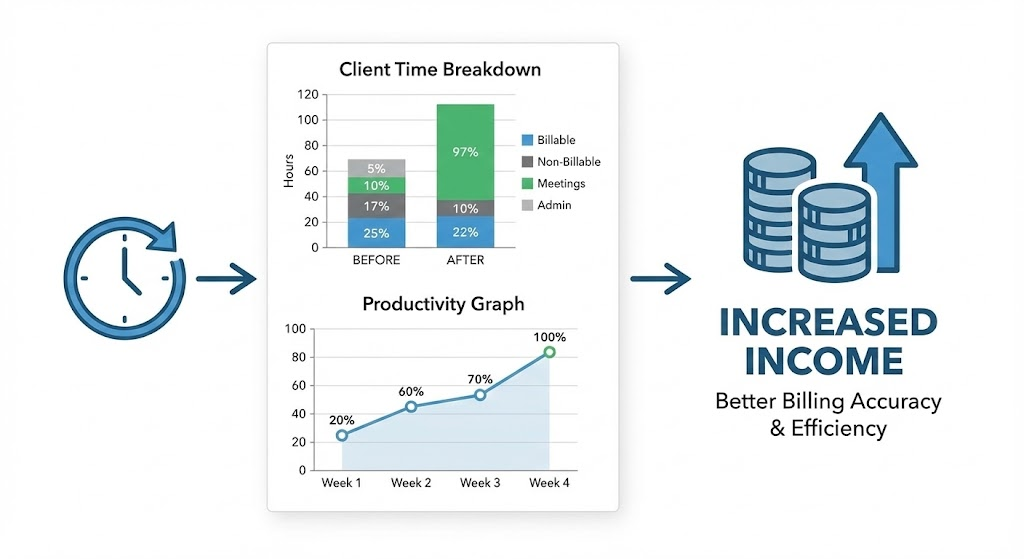
After AI, time tracking becomes the next critical layer in choosing the best tools for freelancers. Time tracking is not about micromanagement. It is about profitability clarity. High-income freelancers track value, not just hours.
Many freelancers avoid time tracking emotionally. They fear accountability. However, data reveals hidden inefficiencies. Once visible, they become fixable.
In my experience, freelancers using time tracking tools improve pricing confidence. They understand effort versus reward clearly.
Why Time Tracking Matters for Freelancer Growth?
Time tracking tools help freelancers identify profit leaks, improve pricing, and optimize workload. This data is essential when deciding to upskill into the highest paid freelancing skills available in the market. Tracking ROI per client increases income predictability.
Time tracking shows which clients consume disproportionate effort. This insight supports renegotiation or termination decisions.
Productivity tools also reveal distractions. Social media, emails, and context switching reduce output silently.
When freelancers see time data, they make better scheduling decisions. This improves work-life balance.
Without tracking, freelancers guess. Guessing limits growth.
Best Time Tracking & Productivity Tools for Freelancers
| Tool | Best For | Strength |
| Toggl | Accurate tracking | Simple UI |
| Clockify | Team scaling | Free tier |
| RescueTime | Focus analysis | Distraction insights |
Toggl suits freelancers needing clean reports. Clockify works for those planning to scale. RescueTime analyzes focus patterns deeply.
Time data also supports better invoicing accuracy. This connects directly with the accounting tools discussed earlier.
Productivity improvement aligns with growth concepts covered in
👉Secret ChatGPT Prompts for Freelancers
Why Busy Freelancers Earn Less Without Tracking Systems?
Being busy feels productive. However, busyness hides inefficiency. Time tracking exposes reality.
Freelancers who avoid tracking often underprice services. They also overwork without proportional rewards.
Tracking systems create clarity. Clarity enables control.
If income growth matters, tracking is non-negotiable.
Communication & Collaboration Tools Freelancers Commonly Use
Choosing the best tools for freelancers in 2026 requires strong communication systems. As freelancers manage clients across time zones, poor communication creates delays, confusion, and dissatisfaction. The right collaboration tools reduce friction while increasing trust.
Many freelancers still rely only on email and messaging apps. This approach scatters information and increases response time. Modern communication tools centralize conversations, feedback, and files.
As a result, freelancers maintain clarity and professionalism.
In my experience consulting with service-based freelancers, communication issues cause more project delays than skill gaps. Systems fix this silently.
What Makes a Communication Tool Freelancer-Friendly?
The best communication tools for freelancers centralize conversations, support async collaboration, and reduce meetings. Tools without structure increase miscommunication.
Async communication matters deeply. Freelancers cannot attend constant calls. Tools that support recorded updates and threaded discussions save time.
Another key factor involves client onboarding. Tools should feel simple for clients. Overly complex systems create resistance.
Security and access control also matter. Freelancers often share sensitive data. Secure platforms protect credibility.
Finally, integration with project management tools improves workflow continuity.
Best Communication & Collaboration Tools for Freelancers
| Tool | Best Use | Key Advantage |
| Slack | Ongoing collaboration | Channel organization |
| Zoom | Client meetings | Stable video |
| Google Meet | Quick calls | Easy access |
| Loom | Async updates | Time-saving videos |
Slack works well for long-term clients. Zoom and Google Meet support live discussions. Loom reduces meeting dependency significantly.
Freelancers using Loom report fewer calls and faster approvals.
Effective communication systems support client retention. This mirrors strategies discussed in
👉Unrevealing Benefits of LinkedIn for Freelancers
Common Communication Mistakes Freelancers Make
- Freelancers often over-communicate without structure. This overwhelms clients.
- Another mistake involves mixing personal and professional channels. Boundaries matter.
- Freelancers also fail to document decisions. Written records prevent disputes.
- Structured communication protects relationships and reduces stress.
Design, Creative & Asset Tools for Freelancers
Design capabilities influence perception. Therefore, choosing the best tools for freelancers must include creative tools. Even non-design freelancers need visuals for proposals, presentations, and marketing.
Design tools have evolved rapidly. AI-assisted platforms now enable faster creation without professional design backgrounds. This empowers freelancers across niches.
In my experience, freelancers using strong visual tools win more proposals. Presentation quality affects trust significantly.
What Makes a Design Tool Ideal for Freelancers?
The best design tools for freelancers offer templates, brand consistency, cloud access, and AI-assisted creation. Tools without collaboration lead to slow revisions.
Speed matters in freelancing. Design tools must support quick edits and version control.
Brand consistency also matters. Freelancers should maintain consistent visuals across assets. Tools with brand kits simplify this.
Cloud-based access enables collaboration. Clients can comment directly, reducing revision cycles.
AI-assisted features further reduce effort and turnaround time.
Most Popular Design Tools Used by Freelance Creators
| Tool | Best For | Strength |
| Canva | Non-designers | Templates + AI |
| Adobe Creative Cloud | Professionals | Advanced editing |
| Figma | UI/UX freelancers | Collaboration |
Canva empowers freelancers without design backgrounds. Adobe suits advanced creators. Figma dominates collaborative design workflows.
Design capability supports personal branding growth, discussed further in
👉How to Create a Digital Marketing Portfolio
Why Visual Quality Impacts Freelancer Income?
- Clients judge quality quickly. Visuals shape first impressions.
- Poor design reduces perceived value. Strong visuals justify premium pricing.
- Design tools act as silent sales assets. Ignoring them limits growth.
- If you want higher-paying clients, visual quality matters.
Cloud Storage & Data Security Tools for Freelancers
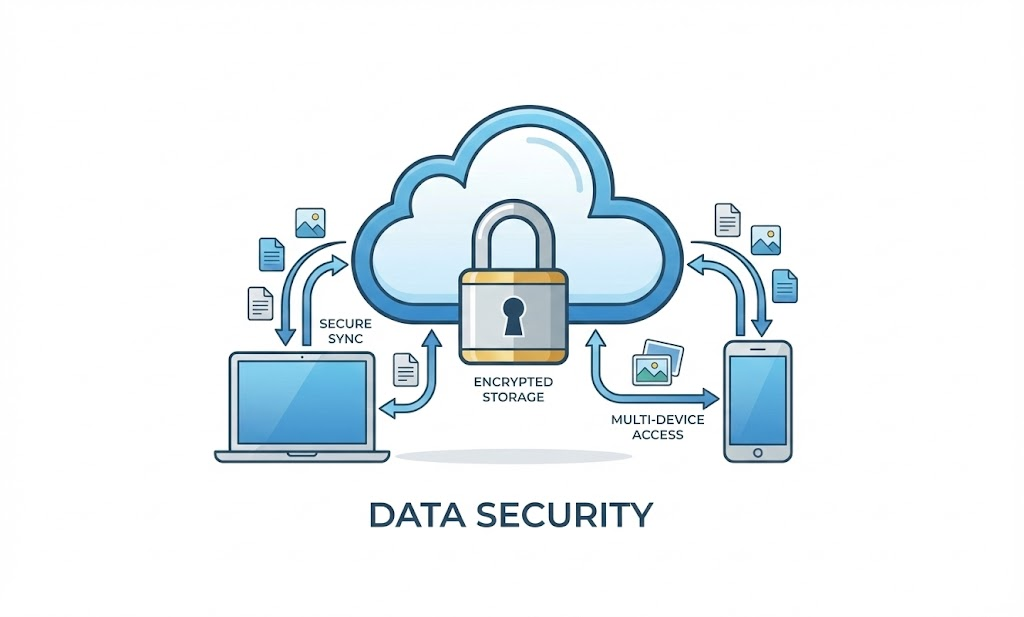
Selecting the best tools for freelancers in 2026 requires serious attention to cloud storage and data security. Freelancers handle client files, credentials, contracts, and intellectual property daily. Without secure storage systems, data loss and trust issues become real threats.
Many freelancers still store files locally. This approach risks device failure, theft, and accidental deletion. Cloud storage tools eliminate these risks.
They also support seamless collaboration across devices and teams.
In my experience consulting with digital professionals, data mishandling damages reputations faster than missed deadlines. Secure systems prevent silent disasters.
What Makes Cloud Storage Essential for Freelancers?
Cloud storage tools protect freelancer data, enable collaboration, and ensure business continuity. Local storage is a liability in 2026.
Cloud storage offers automatic backups. This ensures work is never lost unexpectedly. Access control is another major advantage. Freelancers can restrict file access per client. This improves confidentiality.
Version history also matters. Mistakes become reversible. This reduces stress and rework. Finally, cloud access supports remote work. Freelancers operate from anywhere without disruption.
Best Cloud Storage Tools for Freelancers
| Tool | Best Use | Strength |
| Google Drive | Collaboration | Easy sharing |
| Dropbox | File syncing | Reliable backups |
| OneDrive | Microsoft users | Deep integration |
Google Drive supports real-time collaboration. Dropbox excels at syncing. OneDrive integrates well with Microsoft ecosystems.
Cloud discipline aligns with professional workflows discussed in
👉Digital Marketing for Beginners: A Complete Step-by-Step Guide
Common Data Security Mistakes Freelancers Make
- Freelancers often reuse weak passwords. This increases breach risk.
- Another mistake involves sharing open links. Access should be controlled.
- Freelancers also ignore backups. Redundancy prevents disasters.
- Security is invisible until failure occurs. Prevention matters.
Tools That Help Freelancers Find & Manage Clients
Client acquisition is the best tool for the freelancer’s ecosystem. Without lead generation systems, income becomes unstable. Platforms alone cannot support long-term growth.
Modern freelancers use tools to attract, track, and nurture leads. These systems reduce dependence on freelance marketplaces.
In my experience consulting with growth-focused freelancers, owning lead systems creates pricing power. Platforms limit it.
Where Freelancers Find Clients in 2026?
Freelancers find clients through platforms, personal branding, outreach tools, and referral systems. Owned lead channels outperform marketplaces long-term. If you want to scale effectively, learning how to get international clients is the fastest way to increase your hourly rate. LinkedIn has become the most powerful client acquisition channel. Content and outreach work together.
Platforms still matter initially. However, freelancers should gradually diversify.
LinkedIn has become the most powerful client acquisition channel. Content and outreach work together.
Portfolio websites and email outreach further strengthen lead pipelines. Client referrals remain the highest-converting channel.
Best Tools for Freelancer Client Acquisition
| Tool | Purpose | Advantage |
| Upwork | Platform leads | Quick projects |
| Fiverr | Gig-based work | Entry-level access |
| Personal branding | High-ticket clients | |
| Email tools | Outreach | Owned leads |
Upwork and Fiverr help beginners. LinkedIn supports long-term positioning. Email outreach enables direct control.
Client acquisition strategies align with
👉How to Become a Freelance Digital Marketer
Why Freelancers Must Move Beyond Platforms?
Platforms control visibility and pricing. Algorithm changes impact income suddenly.
Owned systems protect independence. CRM tools support follow-ups.
Freelancers who build audiences earn consistently.
Client acquisition is a system, not luck.
Career Growth, Mentorship & Long-Term Freelance Scaling
Mastering the best tools for freelancers is not only about productivity. In 2026, tools directly impact career trajectory. Freelancers who think short-term focus only on delivery tools. Scalable freelancers invest in growth systems, learning loops, and mentorship-driven decision-making.
Freelancing today competes with agencies, startups, and AI-native operators. Therefore, growth requires intentional upskilling and strategic guidance. Tools enable execution. Mentorship enables direction. Without both, freelancers plateau early.
In my experience consulting with 5,000+ freelancers, the biggest income jumps happen after mindset and system shifts. Not after learning one more skill.
Why Freelancers Hit an Income Ceiling?
Freelancers hit income ceilings due to a lack of systems, mentorship, and strategic upskilling. Tools alone do not guarantee growth without guidance.
Most freelancers rely on self-learning endlessly. This creates scattered knowledge. Without frameworks, execution remains inconsistent.
Another issue involves isolation. Freelancers lack peer benchmarks. Mentorship fills this gap by accelerating clarity.
Freelancers also delay investing in learning. They wait until income drops. By then, recovery becomes harder.
Career growth requires proactive investment, not reactive fixes.
The Role of Mentorship in Freelance Success
Mentorship shortens learning curves dramatically. Instead of trial and error, freelancers gain proven paths.
Mentors help identify blind spots. Freelancers often misjudge pricing, positioning, and tool usage. Structured mentorship also builds accountability. This sustains execution over time.
Programs offering an AI-first curriculum with lifetime mentorship, like AADME, align well with future-ready freelance careers when learning meets execution.
This philosophy mirrors career-building insights shared in
👉Is Digital Marketing a Good Career in 2026?
Skill Stacking for Freelancers in the AI Era
Freelancers must stack complementary skills. Execution skills alone limit income. Combining core skills with AI literacy, automation thinking, and communication multiplies value.
Tool mastery supports this stack. However, the strategy connects it. Career-oriented freelancers design learning paths intentionally.
This aligns with insights from
👉Top In-Demand Digital Marketing Skills You Can’t Ignore in 2026
Proprietary Frameworks Recap (For Long-Term Scaling)
The difference between struggling freelancers and scalable freelancers is never talent. It is frameworks. Throughout this guide on the best tools for freelancers, three proprietary models were introduced to convert tools into long-term income systems. These frameworks remove randomness and replace it with repeatable execution.
In my experience consulting with thousands of freelancers, tools without frameworks create confusion. Frameworks without tools remain theoretical. Sustainable growth happens only when both work together. These models are designed to be practical, measurable, and adaptable across freelancing niches.
Each framework addresses a specific growth bottleneck. When combined, they form a complete operating system for freelancers aiming to scale beyond hourly income.
FREELANCER-OS™ Framework
The FREELANCER-OS™ Framework functions as a business operating system. It structures how freelancers acquire clients, deliver work, manage finances, and scale operations. Instead of juggling disconnected tools, freelancers build a unified workflow.
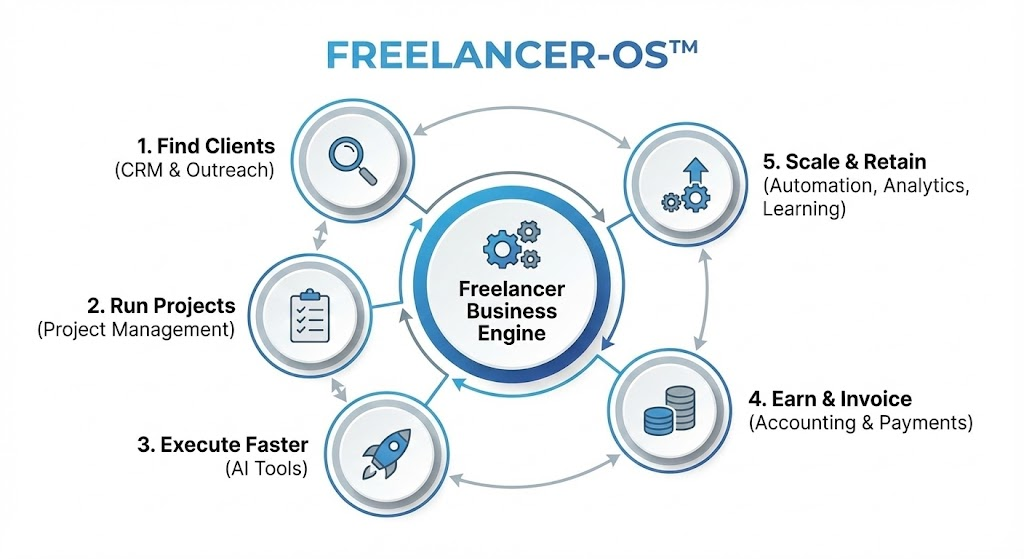
This framework emphasizes intentional tool selection. Every tool must support revenue, efficiency, or retention. Anything else becomes noise. Freelancers using FREELANCER-OS™ experience fewer delays, better client communication, and predictable income cycles.
Most beginners fail by copying tool lists. This framework forces strategic alignment instead.
AI-Leverage Ratio™
The AI-Leverage Ratio™ measures income generated per AI-assisted hour.
This metric reveals whether AI is being used as a multiplier or merely as a convenience. High-performing freelancers optimize this ratio continuously.
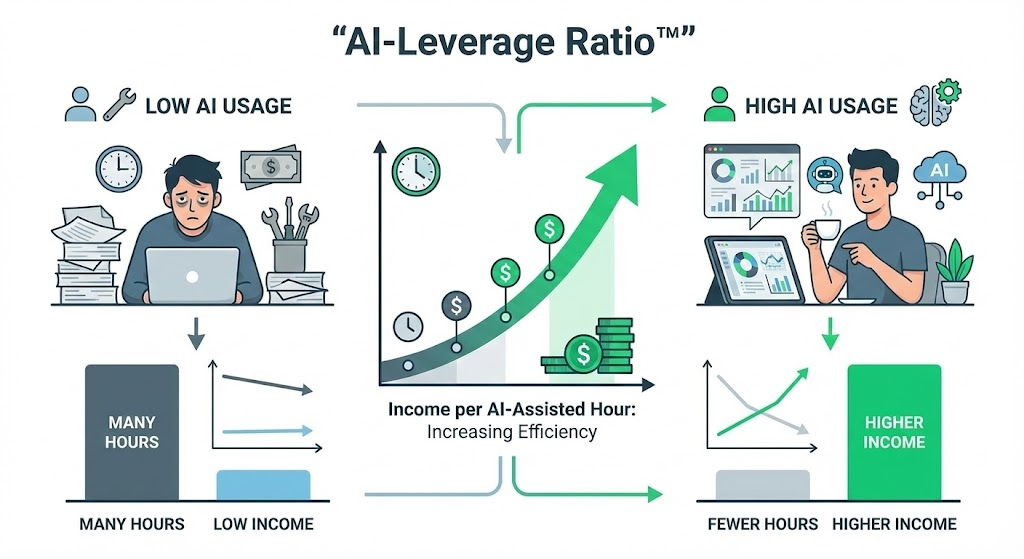
Freelancers with strong AI-Leverage Ratios produce faster outputs without quality loss. They also command higher pricing due to speed and consistency. This ratio shifts focus from working more hours to extracting more value per hour.
In 2026, freelancers ignoring this metric will struggle to compete.
Client Value Ladder™
The Client Value Ladder™ transitions freelancers from low-value tasks to long-term partnerships. It defines clear stages of client engagement, starting with entry-level services and progressing toward retainers and strategic roles.
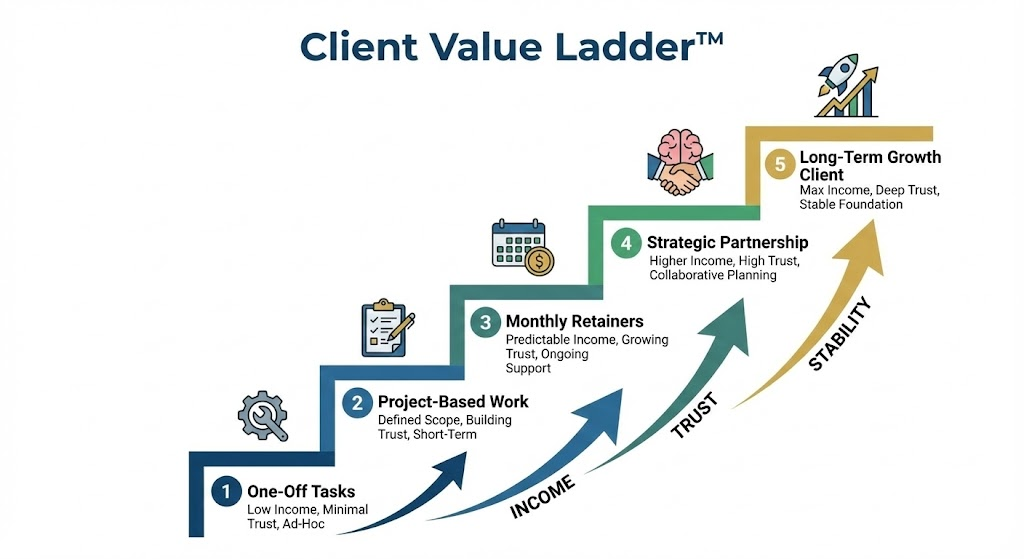
Freelancers stuck at the bottom of this ladder experience income volatility. Those who climb it build stability. Tools such as CRMs, automation, and reporting systems support this progression.
This framework transforms freelancers into trusted partners rather than disposable vendors.
Final Thoughts: Tools Build Freedom, Systems Build Wealth
Freelancing in 2026 rewards clarity over chaos. The best tools for freelancers create operational freedom, but only systems convert that freedom into wealth. Tools help you work. Systems help you scale.
Most freelancers chase productivity hacks. High performers design business infrastructure. They select tools intentionally, connect them logically, and refine workflows continuously. As a result, income grows without proportional effort.
In my experience, freelancers who adopt system-based thinking gain control over time, pricing, and client quality. Those who ignore it remain overworked and underpaid.
Freedom comes from the right tools.
Wealth comes from disciplined systems.
Build both- intentionally and relentlessly.
FAQs: Best Tools for Freelancers
Which software is best for freelancing in 2026?
The best software for freelancing in 2026 includes an integrated stack of ClickUp or Notion for project management, Zoho or HubSpot for CRM, Zoho Invoice for billing, cloud storage like Google Drive, and AI tools such as ChatGPT. System-based software stacks outperform single-purpose tools.
Which device is best for freelancing work?
The best device for freelancing is a modern laptop with at least 16GB RAM, SSD storage, strong battery life, and cloud integration. MacBook Air M-series and high-performance Windows ultrabooks are ideal for most freelance professionals in 2026.
Which technology is best for freelancing careers?
The best technology for freelancing careers includes AI tools, cloud computing, automation software, CRM systems, and project management platforms. Freelancers combining core skills with AI and workflow automation achieve higher income stability and scalability in 2026.
What are the best freelance apps for beginners?
The best freelance apps for beginners include Trello for task management, Canva for design, Zoho Invoice for billing, Google Drive for storage, and ChatGPT for assistance. These apps are easy to use, affordable, and scalable for early-stage freelancers.
What is the best CRM for freelancers managing multiple clients?
The best CRM for freelancers managing multiple clients is HubSpot CRM for free scalability, Zoho CRM for Indian freelancers, and Bonsai for all-in-one client management. These CRMs automate follow-ups, centralize communication, and improve client retention.
Which invoice generator is best for freelancers in India?
Zoho Invoice is the best invoice generator for freelancers in India. It supports GST-compliant invoicing, automated reminders, multi-currency billing, and payment tracking, making it ideal for Indian freelancers working with both local and international clients.
Are there any free accounting software options for freelancers?
Yes, Wave offers free accounting software for freelancers, including income tracking and basic reports. However, free tools lack GST compliance and automation, so Indian freelancers should upgrade to Zoho Books or Vyapar as income grows.
What are the top AI tools for freelancers?
The top AI tools for freelancers include ChatGPT for writing and strategy, Claude for research, Canva AI for design, and Midjourney for creative visuals. These tools replace multiple roles and significantly increase productivity and earning potential.
Which project management app is best for freelancers?
ClickUp is the best project management app for freelancers due to automation, time tracking, and client collaboration. Notion suits flexible workflows, while Trello works best for beginners needing simple task organization.
How do freelancers manage multiple clients efficiently?
Freelancers manage multiple clients efficiently using CRM systems, project management software, time tracking tools, automation workflows, and structured communication platforms. Centralized systems prevent missed deadlines, follow-ups, and workload imbalance.
What are the top project management tools for freelancers?
The top project management tools for freelancers are ClickUp, Notion, Trello, and Asana. These tools support task tracking, client collaboration, timelines, and automation, making them suitable for freelancers at different growth stages.
Which invoicing software is best for freelancers in India?
Zoho Invoice and Zoho Books are the best invoicing software for freelancers in India. They support GST compliance, automated payment reminders, expense tracking, and integration with accounting workflows.
Can you recommend apps for time tracking to boost freelancer productivity?
Toggl, Clockify, and RescueTime are the best time tracking apps for freelancers. They help track billable hours, identify productivity leaks, and improve pricing decisions based on real effort and client ROI.
Where can I find platforms that connect freelancers with clients?
Freelancers can find clients through platforms like Upwork and Fiverr, LinkedIn networking, personal websites, email outreach tools, and referrals. Owned lead channels outperform marketplaces for long-term income stability.
Which tools offer the best cloud storage options for freelancers?
Google Drive, Dropbox, and OneDrive offer the best cloud storage for freelancers. They provide secure backups, collaboration features, access control, and cross-device availability essential for professional freelance operations.
Best accounting software tailored for Indian freelancers?
Zoho Books is the best accounting software for Indian freelancers due to GST compliance, automation, expense tracking, and reporting. Vyapar suits offline users, while Wave works only for non-GST freelancers at the early stages.
How to choose communication tools that freelancers commonly use?
Freelancers should choose communication tools that support async collaboration, client-friendly access, security, and integration. Slack, Zoom, Google Meet, and Loom are the most commonly used tools for efficient freelancer communication.
What are the most popular design tools used by freelance graphic artists?
The most popular design tools used by freelance graphic artists are Adobe Creative Cloud, Canva, and Figma. These tools support professional editing, collaboration, brand consistency, and fast revisions.
Which apps help freelancers manage multiple clients efficiently?
Apps that help freelancers manage multiple clients efficiently include ClickUp for projects, HubSpot or Zoho CRM for client tracking, Toggl for time tracking, and Slack for communication. Integrated app ecosystems reduce workload and errors.